Ability KeyValues
DataDriven Ability
A DataDriven ability is a collection KeyValues. KeyValues are simple, tree-based structures used for storing nested sections containing key/value pairs.
DataDriven abilities are defined inside scripts/npc/npc_abilities_custom.txt under a game addon folder.
This skeleton contains many keyvalues which will be expanded upon in this documentation.
"datadriven_skeleton"
{
    // General
    // ----------------------------------------------------------------------------------------
    "BaseClass"              "ability_datadriven"
    "AbilityBehavior"        "DOTA_ABILITY_BEHAVIOR_UNIT_TARGET"
    "AbilityTextureName"     "spellicon"
    "AbilityUnitTargetTeam"  "DOTA_UNIT_TARGET_TEAM_ENEMY"
    "AbilityUnitTargetType"  "DOTA_UNIT_TARGET_HERO | DOTA_UNIT_TARGET_BASIC"
    "AbilityUnitTargetFlags" "DOTA_UNIT_TARGET_FLAG_MAGIC_IMMUNE_ENEMIES"
    "AbilityUnitDamageType"  "DAMAGE_TYPE_MAGICAL"

    "AbilityType"            "DOTA_ABILITY_TYPE_BASIC"
    "MaxLevel"               "7"
    "RequiredLevel"          "-4"
    "LevelsBetweenUpgrades"  "7"

    "AbilityCastPoint"       "0.0"
    "AbilityCastAnimation"   "ACT_DOTA_ATTACK"
    "AnimationPlaybackRate"  "1"
    "AnimationIgnoresModelScale" "1"

    // Stats
    //----------------------------------------------------------------------------------------
    "AbilityDamage"           "0 0 0 0"
    "AbilityManaCost"         "0 0 0 0"
    "AbilityCooldown"         "0.0 0.0 0.0 0.0"
    "AbilityCastRange"        "0"
    "AbilityCastRangeBuffer"  "250"
    "AbilityChannelTime"      "0.0 0.0 0.0 0.0"
    "AbilityChannelledManaCostPerSecond" "30 35 40 45"
    "AbilityDuration"         "0.0 0.0 0.0 0.0"
    "AoERadius"               "250"

    // ...
}BaseClass
BaseClass can be any default dota ability name or "ability_datadriven", which allows the use of the entire data driven ability system.
Using a dota ability as the BaseClass can be done either as an override of the ability (goes in npc_abilities_override.txt) or just as a new ability in npc_abilities_custom.txt which inherits the exposed variables. This however doesn't let us change/add its internal structure, as that code is locked in C++ code.
Here we'll focus on everything that concerns writing custom abilities from scratch, using the "BaseClass" "ability_datadriven".
AbilityBehavior
This describes how the ability works, the general behavior to perform when it is executed.
You can use different behaviors together, separated by spaces and | pipes.
Example:
"DOTA_ABILITY_BEHAVIOR_CHANNELLED | DOTA_ABILITY_BEHAVIOR_NO_TARGET"List of every possible AbilityBehavior
| AbilityBehavior | Description |
|---|---|
| DOTA_ABILITY_BEHAVIOR_NO_TARGET | Doesn't need a target to be cast. Ability fires off as soon as the button is pressed. |
| DOTA_ABILITY_BEHAVIOR_UNIT_TARGET | Needs a target to be cast on. Requires AbilityUnitTargetTeam and AbilityUnitTargetType, see Targeting. |
| DOTA_ABILITY_BEHAVIOR_POINT | Can be cast anywhere the mouse cursor is. If a unit is clicked, it will just be cast where the unit was standing. |
| DOTA_ABILITY_BEHAVIOR_PASSIVE | Cannot be cast. |
| DOTA_ABILITY_BEHAVIOR_CHANNELLED | Channeled ability. If the user moves, or is silenced/stunned, the ability is interrupted. |
| DOTA_ABILITY_BEHAVIOR_TOGGLE | Can be toggled On/Off. |
| DOTA_ABILITY_BEHAVIOR_AURA | Ability is an aura. Not really used other than to tag the ability as such. |
| DOTA_ABILITY_BEHAVIOR_AUTOCAST | Can be cast automatically. Usually doesn't work by itself in anything that is not an ATTACK ability. |
| DOTA_ABILITY_BEHAVIOR_HIDDEN | Can't be cast, and won't show up on the HUD. |
| DOTA_ABILITY_BEHAVIOR_AOE | Can draw a radius where the ability will have effect. Like POINT, but with an area of effect display. Makes use of AOERadius. |
| DOTA_ABILITY_BEHAVIOR_NOT_LEARNABLE | Cannot be learned by clicking on the HUD. Example: Invoker's abilities. |
| DOTA_ABILITY_BEHAVIOR_ITEM | Ability is tied to an item. There is no need to use this, the game will internally assign this behavior to any "item_datadriven". |
| DOTA_ABILITY_BEHAVIOR_DIRECTIONAL | Has a direction from the hero. Examples: Mirana's Arrow, or Pudge's Hook. |
| DOTA_ABILITY_BEHAVIOR_IMMEDIATE | Can be used instantly, without going into the action queue. |
| DOTA_ABILITY_BEHAVIOR_NOASSIST | Ability has no reticle assist. (?) |
| DOTA_ABILITY_BEHAVIOR_ATTACK | Is an attack, and cannot hit attack-immune targets. |
| DOTA_ABILITY_BEHAVIOR_ROOT_DISABLES | Cannot be used when rooted. |
| DOTA_ABILITY_BEHAVIOR_UNRESTRICTED | Ability is allowed when commands are restricted. Example: Lifestealer's Consume. |
| DOTA_ABILITY_BEHAVIOR_DONT_ALERT_TARGET | Does not alert enemies when target-cast on them. Example: Spirit Breaker's Charge. |
| DOTA_ABILITY_BEHAVIOR_DONT_RESUME_MOVEMENT | Should not resume movement when it completes. Only applicable to no-target, non-immediate abilities. |
| DOTA_ABILITY_BEHAVIOR_DONT_RESUME_ATTACK | Ability should not resume command-attacking the previous target when it completes. Only applicable to no-target, non-immediate abilities and unit-target abilities. |
| DOTA_ABILITY_BEHAVIOR_NORMAL_WHEN_STOLEN | Ability still uses its normal cast point when stolen. Examples: Meepo's Poof, Furion's Teleport. |
| DOTA_ABILITY_BEHAVIOR_IGNORE_BACKSWING | Ability ignores backswing pseudoqueue. |
| DOTA_ABILITY_BEHAVIOR_IGNORE_PSEUDO_QUEUE | Can be executed while stunned, casting, or force-attacking. Only applicable to toggled abilities. Example: Morphling's Attribute Shift. |
| DOTA_ABILITY_BEHAVIOR_RUNE_TARGET | Targets runes. |
| DOTA_ABILITY_BEHAVIOR_IGNORE_CHANNEL | Doesn't cancel abilities with _CHANNELED behavior. |
| DOTA_ABILITY_BEHAVIOR_OPTIONAL_UNIT_TARGET | Bottle and Wards. |
| DOTA_ABILITY_BEHAVIOR_OPTIONAL_NO_TARGET | (?) |
Behavior Tooltips
The following behaviors will generate a line in the ability tooltip. You want at least one behavior of this list. The rest of the ability behaviors don't have any UI support yet.
The UI can only show one behavior tooltip, but internally it will behave as expected, as long as two contradicting keys are not used together (like NO_TARGET with UNIT_TARGET).
| AbilityBehavior | ABILITY: Tooltip | Takes precedence over: |
|---|---|---|
| DOTA_ABILITY_BEHAVIOR_NO_TARGET | No Target | |
| DOTA_ABILITY_BEHAVIOR_UNIT_TARGET | Unit Target | POINT |
| DOTA_ABILITY_BEHAVIOR_POINT | Point Target | |
| DOTA_ABILITY_BEHAVIOR_PASSIVE | Passive | |
| DOTA_ABILITY_BEHAVIOR_CHANNELLED | Channeled | POINT and UNIT |
| DOTA_ABILITY_BEHAVIOR_TOGGLE | Toggle | POINT and UNIT |
| DOTA_ABILITY_BEHAVIOR_AURA | Aura | PASSIVE |
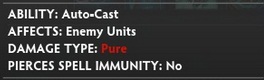
| DOTA_ABILITY_BEHAVIOR_AUTOCAST | Auto-Cast | UNIT_TARGET |
For example, an ability with
"AbilityBehavior" "DOTA_ABILITY_BEHAVIOR_UNIT_TARGET | DOTA_ABILITY_BEHAVIOR_CHANNELED"will be shown like this:

AbilityType
Omitting this will default to DOTA_ABILITY_TYPE_BASIC.
| AbilityType | Description |
|---|---|
| DOTA_ABILITY_TYPE_BASIC | Normal ability, learnable at level 1 and upgradeable every 2 levels. |
| DOTA_ABILITY_TYPE_ULTIMATE | 5 levels between upgrades, and requires level 6 to spend the first point on it. Also tags the ability as ultimate for the HUD. |
| DOTA_ABILITY_TYPE_ATTRIBUTES | Used for attribute_bonus. |
| DOTA_ABILITY_TYPE_HIDDEN | What for? |
Additionally, ability level intervals and limits can be directly changed with these keyvalues inside the ability block:
MaxLevel
The UI currently supports the following ability level displays: 1, 3, 4, and 7.
You can still use any integer value as MaxLevel, and it will assign the proper level values internally, but it will use a combination of these UI display numbers, then "start again" to another UI.
Example:
"MaxLevel" "10"RequiredLevel
At which level the ability can first be learned. This takes negative values, to enable for skills to be skilled at any point, because the next value sets the levels between ranks of the ability, including the first one.
LevelsBetweenUpgrades
How many levels to wait to be able to learn the next rank.
Example:
"MaxLevel"              "7"
"RequiredLevel"         "-4"
"LevelsBetweenUpgrades" "7"Results in an ability that can be first skilled at levels 3/10/17/24/31/38/45.
Max level of the heroes can be changed using the Lua SetCustomHeroMaxLevel(MAX_LEVEL) API function.
AbilityTextureName
The icon file name that should be used in the UI for this ability. You can reutilize the icon from another just by putting that ability name here if desired. The internal name of every default dota ability can be found in: Built-In Ability Names.
To use your own icons, place them in resources/flash3/images/spellicons in your game addon folder, and just directly refer to the image name without the path or the extension.
Format: 128x128 PNG
"AbilityTextureName" "warchasers_buff"
Reject Self-Cast
Added in Reborn:
"CastFilterRejectCaster" "1"Cast While Hidden
Added in Reborn:
"IsCastableWhileHidden" "1"Targeting
3 key elements set the rules for target selection: Team, Type, and Flags.
Team
| AbilityUnitTargetTeam | Description |
|---|---|
| DOTA_UNIT_TARGET_TEAM_BOTH | All |
| DOTA_UNIT_TARGET_TEAM_ENEMY | Enemy |
| DOTA_UNIT_TARGET_TEAM_FRIENDLY | Allied |
| DOTA_UNIT_TARGET_TEAM_NONE | Default value by omission. |
| DOTA_UNIT_TARGET_TEAM_CUSTOM | (?) |
Type
| AbilityUnitTargetType | Targets |
|---|---|
| DOTA_UNIT_TARGET_ALL | Everything, including hidden entities. |
| DOTA_UNIT_TARGET_HERO | npc_dota_hero Heroes. DOTA_NPC_UNIT_RELATIONSHIP_TYPE_HERO |
| DOTA_UNIT_TARGET_BASIC | Basic units, including summons. |
| DOTA_UNIT_TARGET_MECHANICAL | npc_dota_creep_siegeDOTA_NPC_UNIT_RELATIONSHIP_TYPE_SIEGE |
| DOTA_UNIT_TARGET_BUILDING | npc_dota_tower, npc_dota_buildingDOTA_NPC_UNIT_RELATIONSHIP_TYPE_BUILDING |
| DOTA_UNIT_TARGET_TREE | ent_dota_treeExamples: Tangos, Quelling Blade. |
| DOTA_UNIT_TARGET_CREEP | npc_dota_creature, npc_dota_creepSame as BASIC, but might not include things like some summons. Examples: Death Pact, Devour. |
| DOTA_UNIT_TARGET_COURIER | npc_dota_courier, npc_dota_flying_courierDOTA_NPC_UNIT_RELATIONSHIP_TYPE_COURIER |
| DOTA_UNIT_TARGET_NONE | Nothing! |
| DOTA_UNIT_TARGET_OTHER | Everything not included in the previous types. |
| DOTA_UNIT_TARGET_CUSTOM | Not exposed? Examples: Replicate, Sunder, Demonic Conversion, Tether, Infest... |
Flags
Flags allow targeting units that are ignored by default (for example, magic immune enemies,) or to ignore specific types of units that will otherwise be targetable (like Ancients, or magic immune allies.)
| AbilityUnitTargetFlags | Targets / Ignores |
|---|---|
| DOTA_UNIT_TARGET_FLAG_NONE | Default value by omission. |
| DOTA_UNIT_TARGET_FLAG_DEAD | Dead units, which are otherwise ignored. |
| DOTA_UNIT_TARGET_FLAG_MELEE_ONLY | Units with AttackCapabilities DOTA_UNIT_CAP_MELEE_ATTACK. |
| DOTA_UNIT_TARGET_FLAG_RANGED_ONLY | Units with AttackCapabilities DOTA_UNIT_CAP_RANGED_ATTACK. |
| DOTA_UNIT_TARGET_FLAG_MANA_ONLY | Units with mana, without "StatusMana" "0" in the npc_units file. |
| DOTA_UNIT_TARGET_FLAG_CHECK_DISABLE_HELP | Units with Disable Help on. Not sure how to make a DataDriven ability use it? |
| DOTA_UNIT_TARGET_FLAG_NO_INVIS | Ignores invisible units (with MODIFIER_STATE_INVISIBLE.) |
| DOTA_UNIT_TARGET_FLAG_MAGIC_IMMUNE_ENEMIES | Targets ENEMY units with MODIFIER_STATE_MAGIC_IMMUNE.Examples: Ensnare, Culling Blade, Primal Roar... |
| DOTA_UNIT_TARGET_FLAG_NOT_MAGIC_IMMUNE_ALLIES | Ignores FRIENDLY units with MODIFIER_STATE_MAGIC_IMMUNE.Example: Bane's Nightmare. |
| DOTA_UNIT_TARGET_FLAG_NOT_ATTACK_IMMUNE | Ignores units with MODIFIER_STATE_ATTACK_IMMUNE. |
| DOTA_UNIT_TARGET_FLAG_FOW_VISIBLE | Breaks when the unit goes into the fog of war. Examples: Mana Drain, Life Drain. |
| DOTA_UNIT_TARGET_FLAG_INVULNERABLE | Units with MODIFIER_STATE_INVULNERABLE.Examples: Assassinate, Recall, Boulder Smash... |
| DOTA_UNIT_TARGET_FLAG_NOT_ANCIENTS | Ignores units with "IsAncient" "1" defined.Example: Hand of Midas. |
| DOTA_UNIT_TARGET_FLAG_NOT_CREEP_HERO | Ignores units with "ConsideredHero" "1" defined.Examples: Astral Imprisonment, Disruption, Sunder. |
| DOTA_UNIT_TARGET_FLAG_NOT_DOMINATED | Ignores units with MODIFIER_STATE_DOMINATED. |
| DOTA_UNIT_TARGET_FLAG_NOT_ILLUSIONS | Ignores units with MODIFIER_PROPERTY_IS_ILLUSION. |
| DOTA_UNIT_TARGET_FLAG_NOT_NIGHTMARED | Ignores units with MODIFIER_STATE_NIGHTMARED. |
| DOTA_UNIT_TARGET_FLAG_NOT_SUMMONED | Ignores units created through the SpawnUnit action. |
| DOTA_UNIT_TARGET_FLAG_OUT_OF_WORLD | Units with MODIFIER_STATE_OUT_OF_GAME. |
| DOTA_UNIT_TARGET_FLAG_PLAYER_CONTROLLED | Units controllable by a player, accessible with Lua's IsControllableByAnyPlayer(). |
| DOTA_UNIT_TARGET_FLAG_PREFER_ENEMIES | Prioritizes units over trees when both are selectable. |
Clean list:
- DOTA_UNIT_TARGET_FLAG_NONE
- DOTA_UNIT_TARGET_FLAG_DEAD
- DOTA_UNIT_TARGET_FLAG_MELEE_ONLY
- DOTA_UNIT_TARGET_FLAG_RANGED_ONLY
- DOTA_UNIT_TARGET_FLAG_MANA_ONLY
- DOTA_UNIT_TARGET_FLAG_CHECK_DISABLE_HELP
- DOTA_UNIT_TARGET_FLAG_NO_INVIS
- DOTA_UNIT_TARGET_FLAG_MAGIC_IMMUNE_ENEMIES
- DOTA_UNIT_TARGET_FLAG_NOT_MAGIC_IMMUNE_ALLIES
- DOTA_UNIT_TARGET_FLAG_NOT_ATTACK_IMMUNE
- DOTA_UNIT_TARGET_FLAG_FOW_VISIBLE
- DOTA_UNIT_TARGET_FLAG_INVULNERABLE
- DOTA_UNIT_TARGET_FLAG_NOT_ANCIENTS
- DOTA_UNIT_TARGET_FLAG_NOT_CREEP_HERO
- DOTA_UNIT_TARGET_FLAG_NOT_DOMINATED
- DOTA_UNIT_TARGET_FLAG_NOT_ILLUSIONS
- DOTA_UNIT_TARGET_FLAG_NOT_NIGHTMARED
- DOTA_UNIT_TARGET_FLAG_NOT_SUMMONED
- DOTA_UNIT_TARGET_FLAG_OUT_OF_WORLD
- DOTA_UNIT_TARGET_FLAG_PLAYER_CONTROLLED
- DOTA_UNIT_TARGET_FLAG_PREFER_ENEMIES
Fun with Flags
Flags were seen as AbilityUnitTargetFlags completions, but this is not their sole application.
The same applies to Team and Types.
"Flags"and"ExcludeFlags"in a"Target"block gives control over how to target units to apply actions on them later:
"Target"
{
    "Center"    "CASTER"
    "Flags"     "DOTA_UNIT_TARGET_FLAG_DEAD"
}"TargetFlags"in a"LinearProjectile"action allows aLinearProjectileto ignore units that would otherwise be included by default in the Team+Type values, for example those withMODIFIER_STATE_INVISIBLE."Aura_Flags"in a modifier with the other"Aura"keys can be used, for example, to make an aura modifier only affect ranged units by addingDOTA_UNIT_TARGET_FLAG_RANGED_ONLY.
The same applies for Teams and Types.
Example: Targets all friendly units in a radius of the caster, including couriers, buildings, and siege units. Excludes heroes, summons, and other player controlled units.
"Target"
{
    "Center"        "CASTER"
    "Radius"        "%radius"

    // AbilityUnitTargetTeam values.
    "Teams"         "DOTA_UNIT_TARGET_TEAM_FRIENDLY"

    // AbilityUnitTargetTypes
    "Types"         "DOTA_UNIT_TARGET_ALL"
    "ExcludeTypes"  "DOTA_UNIT_TARGET_HERO"

    // AbilityUnitTargetFlags
    "Flags"         "DOTA_UNIT_TARGET_FLAG_NOT_SUMMONED"
    "ExcludeFlags"  "DOTA_UNIT_TARGET_FLAG_PLAYER_CONTROLLED"
}Example: Mirana's Arrow projectile rewrite that only hits heroes, including those that are magic immune:
"LinearProjectile"
{
    "Target"            "POINT"
    "EffectName"        "particles/units/heroes/hero_mirana/mirana_spell_arrow.vpcf"
    "MoveSpeed"         "857"
    "StartRadius"       "115"
    "EndRadius"         "115"
    "StartPosition"     "attach_attack1"
    "FixedDistance"     "3000"
    "TargetTeams"       "DOTA_UNIT_TARGET_TEAM_ENEMY"
    "TargetTypes"       "DOTA_UNIT_TARGET_HERO"
    "TargetFlags"       "DOTA_UNIT_TARGET_FLAG_MAGIC_IMMUNE_ENEMIES"
    "HasFrontalCone"    "0"
    "ProvidesVision"    "1"
    "VisionRadius"      "650"
}With DOTA_UNIT_TARGET_FLAG_MAGIC_IMMUNE_ENEMIES, and with DOTA_UNIT_TARGET_FLAG_NONE:
Other keyvalues of the Action Target block
Line
To target units in a line between the caster and the targeted point.
Instead of the "Radius" keyvalue, which only takes one parameter, Line takes Length and Thickness integer values in a block like this:
"Line"
{
    "Length"    "600"
    "Thickness" "250"
}Limiting the amount of targets
MaxTargets takes an integer value to limit the amount of targets the Target block will select.
"MaxTargets" "10"Random also takes an integer to be as "take up to this number of units randomly."
"Random" "1"(For more complex targeting, Lua scripting is the answer.)
ScriptSelectPoints
Its use is very rare, normally when the targeting is complex we would just use RunScript lua and do all the actions inside the script.
ScriptSelectPoints
{
    ScriptFile
    Function
    Radius
    Count
}A more in-depth explanation is needed to explain the complete usage of the Target block, as understanding the scope of the "Target" "TARGET" keyvalue is one of the most difficult things of the datadriven system.
Sources
- Constants wiki
- Abilities Data Driven wiki
- Extracted npc_abilities.txt file
- holdout_example keyvalues
- random github datamining
- brute-forcing everything for countless hours!
Targeting Tooltips

These are combinations of AbilityUnitTargetTeam + AbilityUnitTargetType and how they appear as AFFECTS: in the UI.
It's important to clarify that AbilityUnitTargetTeam & AbilityUnitTargetType only restricts the behavior of abilities with DOTA_ABILITY_BEHAVIOR_UNIT_TARGET — it will directly change what the spell can be cast on. For other behaviors these tags are just used to display extra info for players.
For example, a DOTA_ABILITY_BEHAVIOR_POINT | DOTA_ABILITY_BEHAVIOR_AOE ability will find its targets in any way and will not be restricted to what the AbilityUnitTarget values say.
Without any AbilityUnitTargetType
| AbilityUnitTargetTeam | AFFECTS: Tooltip |
|---|---|
| DOTA_UNIT_TARGET_TEAM_ENEMY | Enemies |
| DOTA_UNIT_TARGET_TEAM_FRIENDLY | Allies |
| DOTA_UNIT_TARGET_TEAM_BOTH | Units |
With AbilityUnitTargetTeam DOTA_UNIT_TARGET_TEAM_BOTH
| AbilityUnitTargetType | AFFECTS: Tooltip |
|---|---|
| DOTA_UNIT_TARGET_HERO | Heroes |
| DOTA_UNIT_TARGET_ALL | Units |
| DOTA_UNIT_TARGET_BASIC | Units |
| DOTA_UNIT_TARGET_CREEP | Units |
| DOTA_UNIT_TARGET_HERO + DOTA_UNIT_TARGET_BASIC | Units |
"AFFECTS: Buildings"alone doesn't exist yet.DOTA_UNIT_TARGET_BUILDINGdefaults to Allies/Enemies."AFFECTS: Creeps"is also not a thing.
"DOTA_UNIT_TARGET_HERO | DOTA_UNIT_TARGET_BASIC"is the most common target type; use it when you aren't sure what your spell should target.
With AbilityUnitTargetTeam DOTA_UNIT_TARGET_TEAM_ENEMY
| AbilityUnitTargetType | AFFECTS: Tooltip |
|---|---|
| DOTA_UNIT_TARGET_BASIC | Enemy Creeps |
| DOTA_UNIT_TARGET_HERO | Enemy Heroes |
| DOTA_UNIT_TARGET_HERO + DOTA_UNIT_TARGET_BASIC | Enemy Units |
| DOTA_UNIT_TARGET_HERO + DOTA_UNIT_TARGET_BUILDING | Enemy Heroes and Buildings |
| DOTA_UNIT_TARGET_HERO + DOTA_UNIT_TARGET_BASIC + DOTA_UNIT_TARGET_BUILDING | Enemy Units and Buildings |
With AbilityUnitTargetTeam DOTA_UNIT_TARGET_TEAM_FRIENDLY
| AbilityUnitTargetType | AFFECTS: Tooltip |
|---|---|
| DOTA_UNIT_TARGET_BASIC | Allied Creeps |
| DOTA_UNIT_TARGET_HERO | Allied Heroes |
| DOTA_UNIT_TARGET_HERO + DOTA_UNIT_TARGET_BASIC | Allied Units |
| DOTA_UNIT_TARGET_HERO + DOTA_UNIT_TARGET_BUILDING | Allied Heroes and Buildings |
| DOTA_UNIT_TARGET_HERO + DOTA_UNIT_TARGET_BASIC + DOTA_UNIT_TARGET_BUILDING | Allied Units and Buildings |
Adding
DOTA_UNIT_TARGET_MECHANICALwill have no effect on the AFFECTS tooltip.
Any AbilityUnitTargetTeam
| AbilityUnitTargetType | AFFECTS: Tooltip |
|---|---|
| DOTA_UNIT_TARGET_TREE | Trees |
| In the strings but not possible | Self |
Cast Error Strings
The following strings from dota_english.txt control the error messages shown when a spell cannot be cast on a target. Many are not yet exposed:
"dota_hud_error_cant_cast_on_hero"              "Ability Can't Target Heroes"
"dota_hud_error_cant_cast_on_considered_hero"   "Ability Can't Target Creep Heroes"
"dota_hud_error_cant_cast_on_creep"             "Ability Can't Target Creeps"
"dota_hud_error_cant_cast_on_mechanical"        "Ability Can't Target Mechanical Units"
"dota_hud_error_cant_cast_on_building"          "Ability Can't Target Buildings"
"dota_hud_error_cant_cast_on_courier"           "Ability Can't Target Couriers"
"dota_hud_error_cant_cast_on_other"             "Ability Can't Target That"
"dota_hud_error_cant_cast_on_self"              "Ability Can't Target Self"
"dota_hud_error_cant_cast_on_ally"              "Ability Can't Target Allies"
"dota_hud_error_cant_cast_on_enemy"             "Ability Can't Target Enemies"
"dota_hud_error_cant_cast_on_roshan"            "Ability Can't Target Roshan"
"dota_hud_error_cant_cast_on_non_tree_ward"     "Ability Can Only Target Trees and Enemy Wards"
"dota_hud_error_cant_target_shop"               "Can't Target Shop"
"dota_hud_error_cant_target_rune"               "Can't Target Rune"
"dota_hud_error_cant_target_item"               "Can't Target Item"
"dota_hud_error_cant_cast_on_ancient"           "Ability Can't Target Ancients"
"dota_hud_error_cant_cast_on_own_illusion"      "Ability Can't Target Own Illusion"
"dota_hud_error_cant_cast_on_summoned"          "Ability Can't Target Summoned Units"
"dota_hud_error_cant_cast_on_dominated"         "Ability Can't Target Dominated Units"
"dota_hud_error_cant_cast_enemy_hero"           "Ability Can't Target Enemy Heroes"
"dota_hud_error_cant_cast_creep_level" "Ability Can't Target Creeps of This Level"AbilityUnitDamageType
Physical Damage can be reduced by Physical Armor or Damage Block. Magical Damage can be reduced by Magical Damage Resistance. Pure Damage cannot be reduced by either.
DAMAGE_TYPE_MAGICALDAMAGE_TYPE_PHYSICALDAMAGE_TYPE_PURE
"AbilityUnitDamageType" "DAMAGE_TYPE_MAGICAL"
This keyvalue also shows a DAMAGE: line in the ability tooltip, just after ABILITY: and AFFECTS:.
Keep in mind that AbilityUnitDamageType is only for displaying the tooltip in the UI. The real damage is applied through Damage Actions which have a Type of their own and aren't restricted to the value defined here (a spell can have multiple damage instances of different types).
"Damage"
{
    "Target"  "TARGET"
    "Type"    "DAMAGE_TYPE_PHYSICAL"
    "Damage"  "%AbilityDamage"
}SpellImmunityType
Controls whether the ability pierces spell immunity (formerly "Magic Immunity").
SPELL_IMMUNITY_ENEMIES_NOSPELL_IMMUNITY_ENEMIES_YES
Ability tooltips show two related fields:
- Damage Type: Physical / Magical / Pure
- Pierces Spell Immunity: Yes / No
If the damage type is not Magical, or if it pierces spell immunity, the tooltip is colored differently to make it easier to notice.
Animation
How will the hero move and act after the player decides to cast the ability.
AbilityCastPoint
Time before the spell goes off when cast; can be cancelled with the Stop command. Takes a float value.
"AbilityCastPoint" "0.3"AbilityCastAnimation
Usually the ability slot determines the animation used by default. You can force a different cast animation with this key.
Common activity values:
ACT_DOTA_ATTACKACT_DOTA_CAST_ABILITY_1(2, 3, 4, 5, 6)ACT_DOTA_CHANNEL_ABILITY_1(2, 3, 4, 5, 6)ACT_DOTA_DISABLEDACT_DOTA_RUNACT_DOTA_SPAWNACT_DOTA_TELEPORTACT_DOTA_VICTORY
Full ACT List — many won't work or will only work on certain heroes.
"AbilityCastAnimation" "ACT_DOTA_ATTACK"AnimationIgnoresModelScale
Animations have a predefined time designed for units at default model scale (1). When set to 1 (default), a unit with increased model scale will still use the default animation time, making it look faster on bigger models (or slower on small ones).
Set to 0 to make the animation time scale with the model:
"AnimationIgnoresModelScale" "0"AnimationPlaybackRate
Animation speed multiplier. Takes the animation time and makes it faster or slower by a factor. Cast point is independent and is not affected by this value.
"AnimationPlaybackRate" "2"General Ability Stats
Damage
"AbilityDamage" "100 200 300 400"This damage value won't be dealt by itself — you'll later reference %AbilityDamage in a Damage Action block to let the game adjust with ability level. The tooltip automatically generates a DAMAGE: line from this value.

However this is a single instance; if you want different damage instances or different tooltip labels (e.g. "DAMAGE PER SECOND:") you'll need to use AbilitySpecial blocks instead.
Mana Cost
Shows the mana cost in the UI and blocks the cast if there's not enough mana.
"AbilityManaCost" "30 35 40 45"
Cooldown
Shows the cooldown in the UI and blocks the cast while recharging. Accepts floats but will round to integer if no decimal point is given.
"AbilityCooldown" "10.5 8 6 3.22"
AbilityCastRange
For DOTA_ABILITY_BEHAVIOR_UNIT_TARGET and DOTA_ABILITY_BEHAVIOR_POINT this sets the maximum range. If targeted beyond this distance, the unit will move within cast range before casting.
"AbilityCastRange" "600"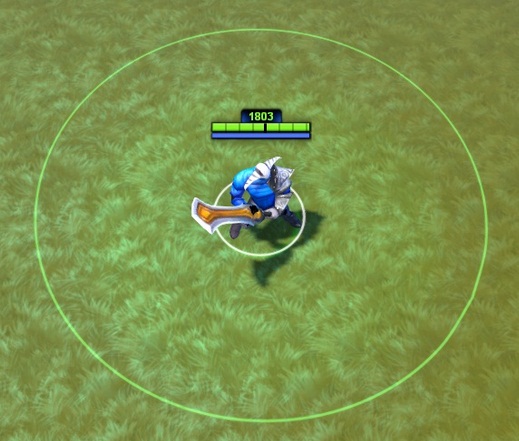
AbilityCastRangeBuffer
The spell will cancel if the target moves beyond CastRange + CastRangeBuffer. Normally used with high AbilityCastPoint.
"AbilityCastRangeBuffer" "250"Examples: Assassinate, Nether Strike.
AbilityCastMinimumRange
Not hooked up in most versions, but can be found in holdout_example:
"AbilityCastMinimumRange" "500"AbilityDuration
"AbilityDuration" "20"This is a shortcut that should generally be avoided. Unlike AbilityDamage, it does not generate a "DURATION:" tooltip by itself. If you want to display the duration, you still need to make an AbilitySpecial entry. Only use AbilityDuration when you aren't concerned about displaying it as a variable tooltip (e.g. when you just write "Lasts 5 seconds." in the ability _Description).
If you ever change the value, you'll need to update both AbilityDuration and the tooltip string manually.
AoERadius
Requires "AbilityBehavior" "DOTA_ABILITY_BEHAVIOR_AOE" (along with POINT and/or UNIT_TARGET). Displays the area of effect circle on the ground.
Important: This only affects the visual indicator, not the actual spell behavior. Real radius values should be controlled with AbilitySpecial entries.
"AoERadius" "250"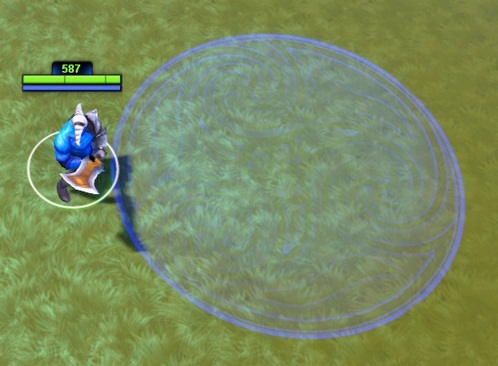
Channelling
For "AbilityBehavior" "DOTA_ABILITY_BEHAVIOR_CHANNELLED":
Channel Time — defaults to 0, so it's very important to set this or the channel will instantly end:
"AbilityChannelTime" "5.0"
Channelled Mana Cost Per Second — an additional cost to maintain the channel:
"AbilityChannelTime"                 "5.0"
"AbilityChannelledManaCostPerSecond" "30 35 40 45"Other First-Level KeyValues
AbilitySharedCooldown
Links abilities/items together on a shared cooldown. Use the same string value in every ability you want to link:
"AbilitySharedCooldown" "linkedProjectile"When any of the linked abilities is used, all others go on cooldown simultaneously.
AbilitySharedWithTeammates
Ability on a unit controlled by a team which can be used by everyone on that team (e.g. a building with upgrades purchasable by the team).
"AbilitySharedWithTeammates" "1"Gold Cost
AbilityGoldCost
Cost in gold to use the ability each time.
AbilityUpgradeGoldCost
Cost in gold to learn and upgrade the ability.
"AbilityGoldCost"        "100"
"AbilityUpgradeGoldCost" "300"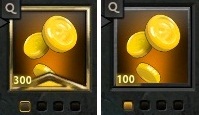
Stats Tracking
Related to fantasy points calculation.
AbilityModifierSupportValue
Float from 0.0 to 1.0. Abilities that do less damage but are important to secure the kill have a greater value.
"AbilityModifierSupportValue" "0.6"— Applies multiple modifiers (e.g. Beastmaster: Primal Roar)"AbilityModifierSupportValue" "0.5"— Primarily about the summon (e.g. Warlock's Rain of Chaos)"AbilityModifierSupportValue" "0.1"— Just a ministun (e.g. Zeus: Lightning Bolt)"AbilityModifierSupportValue" "0.0"— Primarily about the damage (e.g. Lich: Chain Frost)
AbilityModifierSupportBonus
Integer. Abilities with generally higher impact on securing the kill have a higher bonus.
"AbilityModifierSupportBonus" "5"— Lycan: Howl"AbilityModifierSupportBonus" "35"— Jakiro's Liquid Fire"AbilityModifierSupportBonus" "100"— Templar Assassin: Trap"AbilityModifierSupportBonus" "120"— Alchemist: Unstable Concoction Throw
Magic Stick
AbilityProcsMagicStick
Useful for 0-second cooldown custom abilities if the game mode uses the default Magic Wand item.
"AbilityProcsMagicStick" "1"Legacy Keys
HotKeyOverride
If Legacy Keys are enabled, the ability will use this hotkey. Note: only works with Legacy Keys, and there is no way to force players to use them.
"HotKeyOverride" "K"
Meepo / Lone Druid UI
DisplayAdditionalHeroes
Adding this to an ability will show the main hero and any additional heroes under the player's control in the top-left UI (similar to Meepo or Lone Druid).
"DisplayAdditionalHeroes" "1"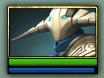
Notes:
- DataDriven
SpawnUnitwith annpc_dota_heroas the UnitName and Lua will crash the game. UseCreateHeroForPlayerinstead. npc_dota_lone_druid_bear4doesn't show up as a new hero in the UI.
FightRecapLevel
Used by the Fight Recap UI to prioritize the most important abilities and items used in a fight.
- Level 2: Cheese, Mek, Hex, BKB, Aegis, and most Ultimates with high cooldown
- Level 1: Everything else
"FightRecapLevel" "2"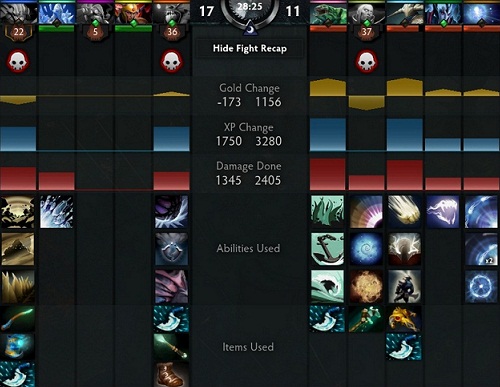
OnCastbar / OnLearnbar
Presence of the Dark Lord and Necromastery have these at 0, but changing them to 1 doesn't produce noticeable effects. Use DOTA_ABILITY_BEHAVIOR_HIDDEN to hide from the cast bar, and DOTA_ABILITY_BEHAVIOR_NOT_LEARNABLE to hide from the learn bar instead.
"OnCastbar"  "1"
"OnLearnbar" "1"AbilitySpecial Block
This block serves two purposes:
- Defining values that change as the ability levels up, referenced with
%value - Formatting ability tooltips
Structure
"AbilitySpecial"
{
    "01"
    {
        "var_type"  "FIELD_INTEGER"
        "value"     "3 4 5 6 7 8"
    }
    "02"
    {
        "var_type"      "FIELD_FLOAT"
        "another_value" "3.0"
    }
}Variable Values
Wherever a value is needed, use "%name" to grab it from the AbilitySpecial block of that name.
Tooltips
For every AbilitySpecial block you can add a corresponding tooltip string that will automatically pull the values into the ability tooltip. Given the example above inside an ability named datadriven_skeleton, the strings in addon_english.txt would be:
"DOTA_Tooltip_Ability_datadriven_skeleton"             "Tooltip Example"
"DOTA_Tooltip_Ability_datadriven_skeleton_Description" "This shows the basic tooltip syntax"
"DOTA_Tooltip_Ability_datadriven_skeleton_Note0"       "This shows when hovering with Alt pressed"
"DOTA_Tooltip_Ability_datadriven_skeleton_Lore"        "And then, there was Documentation."
"DOTA_Tooltip_Ability_datadriven_skeleton_value"       "SOME:"
"DOTA_Tooltip_Ability_datadriven_skeleton_another_value" "DATA:"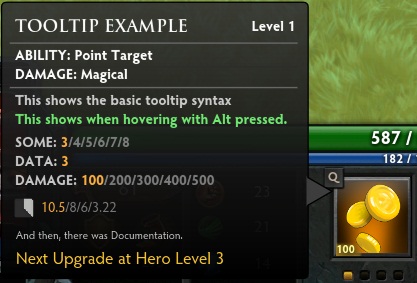
precache Block
When using a particle, sound, or model asset inside a custom ability or item, if the resource is not preloaded it won't appear in game. This is especially important when using content from heroes that weren't loaded by the players.
"precache"
{
    "particle"  "particles/units/heroes/hero_legion_commander/legion_commander_duel_victory.vpcf"
    "particle"  "particles/units/heroes/hero_legion_commander/legion_commander_duel_buff.vpcf"
    "soundfile" "soundevents/game_sounds_heroes/game_sounds_legion_commander.vsndevts"
    "model"     "models/particle/legion_duel_banner.vmdl"
}The asset relative path can be copied directly from the Asset Browser:
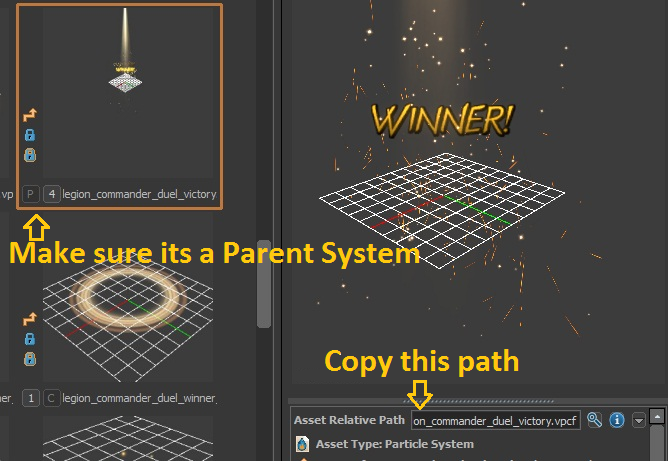
A parent particle is a system with secondary child particles. Precaching a parent particle system will usually precache all of its children.
Full folders can also be precached through "particle_folder" and "model_folder", but this is not recommended as it increases memory usage.
Lua Precache
The Precache() function in addon_game_mode.lua has issues with clients appropriately precaching assets. If this occurs, it causes the client to never precache things configured in that block.
You'll test your addon in the Tools and it will work fine because you are the host, but as soon as you upload it to the Workshop and make a lobby with 2 or more players, many particles, sounds, and models will not be seen by clients if you don't use this function with caution.
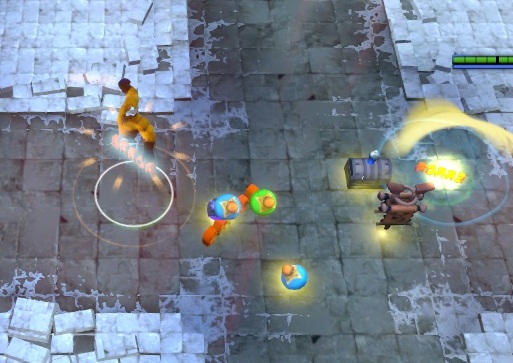
Try to always use a datadriven precache block — it will always preload what it has defined inside when the hero is picked. Use PostLoadPrecache() if you need to preload units or items that are created dynamically.
Ability Events
See the detailed guide on Ability Events with Actions.
| Ability Event | Triggers |
|---|---|
| OnSpellStart | After the AbilityCastPoint is finished |
| OnToggleOn | Activating a DOTA_ABILITY_BEHAVIOR_TOGGLE |
| OnToggleOff | Deactivating a _TOGGLE |
| OnChannelFinish | Ending a channelled ability under any condition |
| OnChannelInterrupted | Ending a channel prematurely |
| OnChannelSucceeded | Ending after AbilityChannelTime has been completed |
| OnOwnerDied | Unit with this ability dies |
| OnOwnerSpawned | Unit with this ability spawns |
| OnProjectileHitUnit | A projectile collides with a valid unit |
| OnProjectileFinish | A projectile finishes its fixed distance |
| OnEquip | Item picked up |
| OnUnequip | Item leaves the inventory |
| OnUpgrade | Upgrading the ability from the HUD |
| OnAbilityPhaseStart | When the ability is cast (before the unit turns to target) |
List of Actions
An Event can contain as many Actions as needed.
| Action | Parameters |
|---|---|
| AddAbility | Target, AbilityName |
| ActOnTargets | Target, Action |
| ApplyModifier | Target, ModifierName, Duration |
| ApplyMotionController | Target, ScriptFile, HorizontalControlFunction, VerticalControlFunction, TestGravityFunc |
| AttachEffect | EffectName, EffectAttachType, Target, TargetPoint, ControlPoints, ControlPointEntities, EffectRadius, EffectDurationScale, EffectLifeDurationScale, EffectColorA, EffectColorB, EffectAlphaScale |
| Blink | Target |
| CleaveAttack | CleaveEffect, CleavePercent, CleaveRadius |
| CreateBonusAttack | Target |
| CreateThinker | Target, ModifierName |
| CreateThinkerWall | Target, ModifierName, Width, Length, Rotation |
| CreateItem | Target, ItemName, ItemCount, ItemChargeCount, SpawnRadius, LaunchHeight, LaunchDistance, LaunchDuration |
| Damage | Target, Type, MinDamage/MaxDamage, Damage, CurrentHealthPercentBasedDamage, MaxHealthPercentBasedDamage |
| DelayedAction | Delay, Action |
| DestroyTrees | Target, Radius |
| FireEffect | EffectName, EffectAttachType, Target, TargetPoint, ControlPoints, EffectRadius, EffectDurationScale, EffectLifeDurationScale, EffectColorA, EffectColorB, EffectAlphaScale |
| FireSound | EffectName, Target |
| GrantXPGold | Target, XPAmount, GoldAmount, ReliableGold, SplitEvenly |
| Heal | HealAmount, Target |
| IsCasterAlive | OnSuccess, OnFailure |
| Knockback | Target, Center, Duration, Distance, Height, IsFixedDistance, ShouldStun |
| LevelUpAbility | Target, AbilityName |
| Lifesteal | Target, LifestealPercent |
| LinearProjectile | Target, EffectName, MoveSpeed, StartRadius, EndRadius, FixedDistance, StartPosition, TargetTeams, TargetTypes, TargetFlags, HasFrontalCone, ProvidesVision, VisionRadius |
| MoveUnit | Target, MoveToTarget |
| Random | Chance, PseudoRandom, OnSuccess, OnFailure |
| RemoveAbility | Target, AbilityName |
| RemoveModifier | Target, ModifierName |
| RemoveUnit | Target |
| ReplaceUnit | UnitName, Target |
| Rotate | Target, PitchYawRoll |
| RunScript | Target, ScriptFile, Function, (extra parameters) |
| SpawnUnit | UnitName, UnitCount, UnitLimit, SpawnRadius, Duration, Target, GrantsGold, GrantsXP, OnSpawn |
| Stun | Target, Duration |
| SpendMana | Mana |
| TrackingProjectile | Target, EffectName, Dodgeable, ProvidesVision, VisionRadius, MoveSpeed, SourceAttachment |
Note: When used inside a modifier,
AttachEffectwill automatically stop the particle after the modifier is destroyed, whileFireEffectwon't. If youFireEffectwith a particle of infinite duration inside a modifier, it will persist after the modifier ends.
Modifiers

The Modifiers block contains each modifier definition:
"Modifiers"
{
    "modifier_example"
    {
        // ...
    }
    "another_modifier"
    {
        // ...
    }
}Modifier Skeleton
"modifier_example"
{
    "Attributes"       "MODIFIER_ATTRIBUTE_MULTIPLE"
    "Duration"         "10"
    "Passive"          "0"
    "TextureName"      "spellicon"

    "IsDebuff"         "0"
    "IsHidden"         "0"
    "IsPurgable"       "0"

    "EffectName"        "particles/effect_name.vpcf"
    "EffectAttachType"  "follow_origin"

    "StatusEffectName"     "particles/status_fx/status_effect_frost_lich.vpcf"
    "StatusEffectPriority" "10"

    "OverrideAnimation" "ACT_DOTA_VICTORY"

    // Properties {}
    // States {}
    // Modifier Events
}Attributes
| Attribute | Description |
|---|---|
| MODIFIER_ATTRIBUTE_NONE | Default value, same as omitting this key |
| MODIFIER_ATTRIBUTE_MULTIPLE | Multiple instances of the same modifier can be applied and will not override each other |
| MODIFIER_ATTRIBUTE_PERMANENT | Persists through death |
| MODIFIER_ATTRIBUTE_IGNORE_INVULNERABLE | Remains on units with MODIFIER_STATE_INVULNERABLE. To apply to an invulnerable unit you also need DOTA_UNIT_TARGET_FLAG_INVULNERABLE |
"Attributes" "MODIFIER_ATTRIBUTE_MULTIPLE"
Duration
The modifier ticks down and removes itself after a duration in seconds. Omit to make it last indefinitely (or until something removes it).
"Duration" "10"Passive
The modifier is automatically applied to the unit when the ability is acquired. Default is 0. Used on most items and passive abilities.
"Passive" "1"TextureName
Allows using a different icon in the buff bar. By default uses the ability icon from AbilityTextureName.
IsBuff / IsDebuff / IsPurgable
Each defaults to 0 if omitted. Every modifier is displayed with a green border by default, but is not considered a Buff unless "IsBuff" "1" is set. Setting "IsDebuff" "1" shows a red border to indicate a negative effect.
"IsDebuff" "1"
If "IsPurgable" "1", Purge and Dispel mechanics will act according to the IsBuff/IsDebuff values:
"IsDebuff" "1"modifiers are purged from friendly units"IsBuff" "1"modifiers are purged from enemy units
Setting "IsStunDebuff" "true" requires a strong dispel (like Abaddon's Shield or Repel) to be removed.
Particles on Modifiers
To attach a particle effect for the duration of the modifier, use these two keys together:
EffectName — name of the particle system to use. Most buff-type particles work. Make sure to use a parent particle.
EffectAttachType — where on the unit the particle is displayed. Most common values:
follow_origin— body/feet, moves with the unitfollow_overhead— on top of the model, moves with the unit
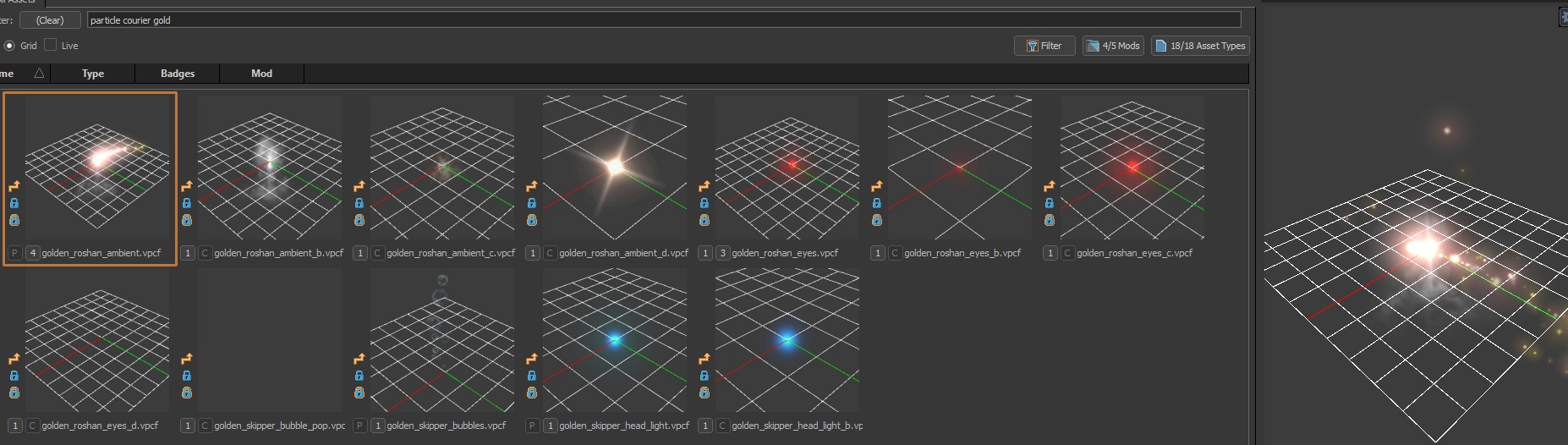
"modifier_golden"
{
    "Passive"          "1"
    "EffectName"       "particles/econ/courier/courier_golden_roshan/golden_roshan_ambient.vpcf"
    "EffectAttachType" "follow_origin"
}Additional or complex particles should be attached with the AttachEffect action inside an OnCreated modifier event. Example with multiple effects:
"modifier_much_gold"
{
    "Duration" "3"
    "States"
    {
        "MODIFIER_STATE_NO_HEALTH_BAR" "MODIFIER_STATE_VALUE_ENABLED"
    }
    "OnCreated"
    {
        "AttachEffect"
        {
            "Target"           "CASTER"
            "EffectName"       "particles/econ/items/gyrocopter/hero_gyrocopter_gyrotechnics/gyro_calldown_marker.vpcf"
            "EffectAttachType" "follow_origin"
            "EffectRadius"     "100"
        }
        "AttachEffect"
        {
            "Target"                "CASTER"
            "EffectName"            "particles/units/heroes/hero_alchemist/alchemist_lasthit_coins.vpcf"
            "EffectAttachType"      "start_at_customorigin"
            "ControlPointEntities"
            {
                "CASTER" "attach_origin"
                "CASTER" "attach_origin"
            }
        }
        "AttachEffect"
        {
            "EffectName"       "particles/units/heroes/hero_alchemist/alchemist_acid_spray.vpcf"
            "EffectAttachType" "follow_origin"
            "Target"           "CASTER"
            "ControlPoints"
            {
                "00" "0 0 0"
                "01" "200 1 1"   // Radius
                "15" "255 200 0" // Color
                "16" "1 0 0"
            }
        }
    }
}Status Effect Particles
These apply a texture overlay to the unit. Search for status_effect in the Asset Browser.
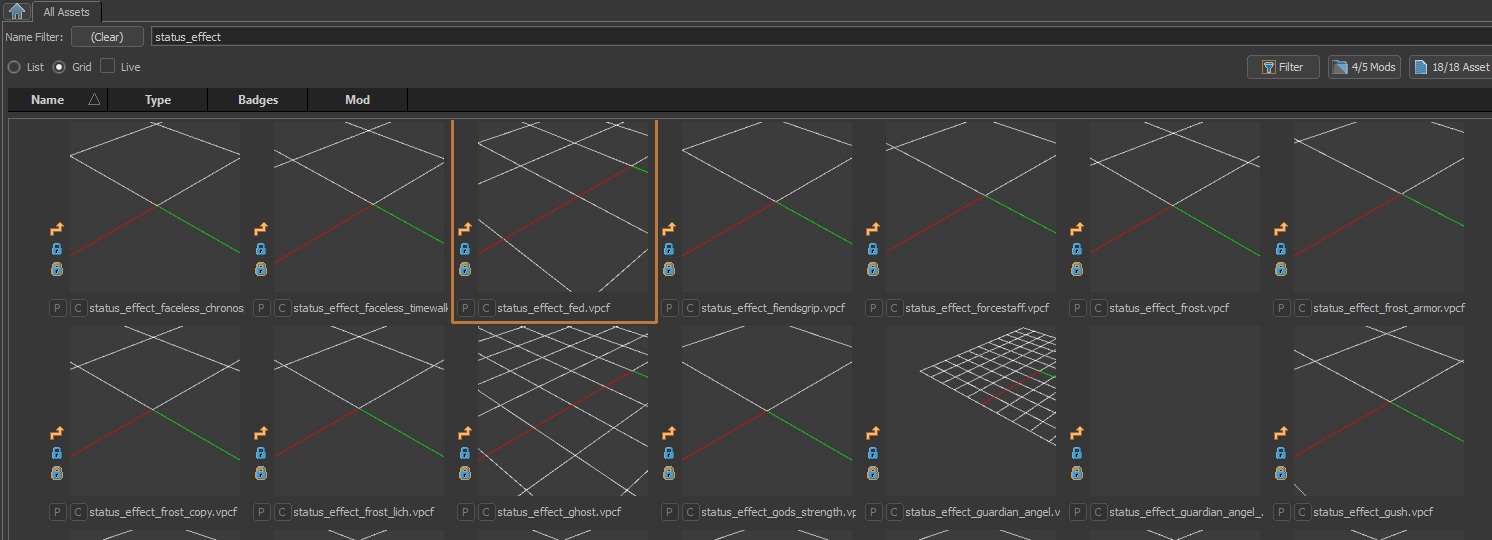
"StatusEffectName"     "particles/status_fx/status_effect_frost_lich.vpcf"
"StatusEffectPriority" "10"StatusEffectPriority allows more important effects to override others with lower priority values.
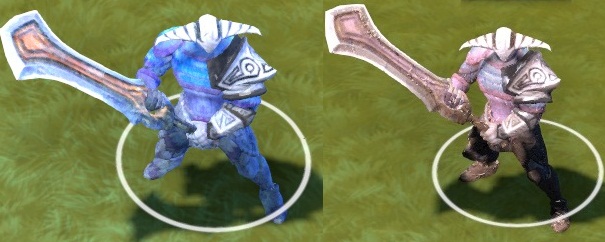
status_effect_frost_lich · status_effect_medusa_stone_gaze
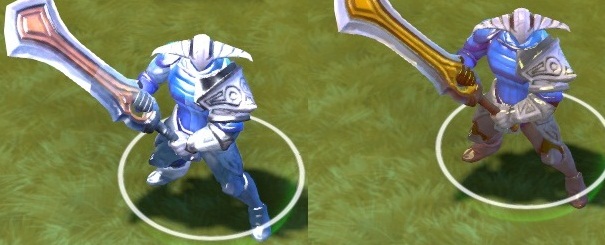
status_effect_forcestaff · status_effect_avatar
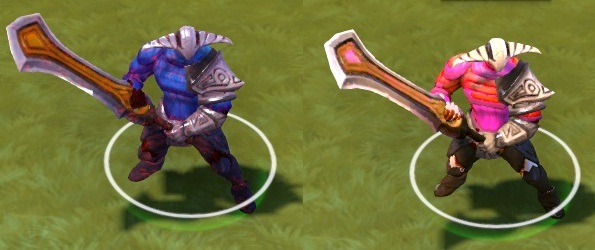
status_effect_doom · status_effect_gods_strength
OverrideAnimation
Forces a specific animation while the modifier is active. Can use any ACT_ value from the Animation section.
"modifier_sleep"
{
    "EffectName"        "particles/newplayer_fx/npx_sleeping.vpcf"
    "EffectAttachType"  "follow_overhead"
    "OverrideAnimation" "ACT_DOTA_DISABLED"
    "States"
    {
        "MODIFIER_STATE_NO_HEALTH_BAR" "MODIFIER_STATE_VALUE_ENABLED"
    }
}Aura
A modifier with Aura keys automatically applies the specified modifier to every valid unit within Aura_Radius, removing it when units leave the radius.
"Modifiers"
{
    "modifier_armor_aura"
    {
        "Passive"   "1"
        "IsHidden"  "1"

        "Aura"              "armor_aura_effect"
        "Aura_Radius"       "%radius"
        "Aura_Teams"        "DOTA_UNIT_TARGET_TEAM_FRIENDLY"
        "Aura_Types"        "DOTA_UNIT_TARGET_HERO | DOTA_UNIT_TARGET_BASIC"
        "Aura_Flags"        "DOTA_UNIT_TARGET_FLAG_MAGIC_IMMUNE_ENEMIES"
        "Aura_ApplyToCaster" "0"
    }

    "armor_aura_effect"
    {
        "Properties"
        {
            "MODIFIER_PROPERTY_PHYSICAL_ARMOR_BONUS" "%armor_bonus"
        }
    }
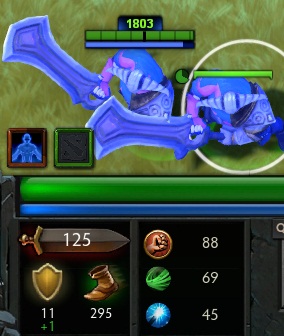
}Illusions (AllowIllusionDuplicate)
By default illusions don't inherit modifiers from the original hero. Set this to make the modifier copy to illusions:
"modifier_armor_oncopies"
{
    "Passive"                "1"
    "AllowIllusionDuplicate" "1"
    "Properties"
    {
        "MODIFIER_PROPERTY_PHYSICAL_ARMOR_BONUS" "1 2 3"
    }
}
Repeating Actions (ThinkInterval)
Used with the OnIntervalThink modifier event to execute actions on a timer:
"modifier_midas_effect"
{
    "ThinkInterval"  "1"
    "OnIntervalThink"
    {
        "FireEffect"
        {
            "EffectName"       "particles/items2_fx/hand_of_midas.vpcf"
            "Target"           "CASTER"
            "EffectAttachType" "follow_origin"
        }
    }
}Priority
Makes a state like invisibility not be overridden by lower-priority effects.
"Priority" "MODIFIER_PRIORITY_ULTRA"Possible values: MODIFIER_PRIORITY_ULTRA and MODIFIER_PRIORITY_HIGH.
ModelName
A datadriven way to change the model of a unit from within a modifier:
"ModelName" "models/heroes/doom/doom.vmdl"Properties Block

This block inside a modifier gives numeric stat bonuses from the list of modifier properties. Supports AbilitySpecial references and negative values.
"modifier_slow"
{
    "IsDebuff"  "1"
    "Duration"  "%duration"
    "Properties"
    {
        "MODIFIER_PROPERTY_ATTACKSPEED_BONUS_CONSTANT"  "%attackspeed_reduction"
        "MODIFIER_PROPERTY_MOVESPEED_BONUS_PERCENTAGE"  "%movespeed_reduction_percentage"
    }
}List of Modifier Properties
- MODIFIER_PROPERTY_ABILITY_LAYOUT
- MODIFIER_PROPERTY_ABSOLUTE_NO_DAMAGE_MAGICAL
- MODIFIER_PROPERTY_ABSOLUTE_NO_DAMAGE_PHYSICAL
- MODIFIER_PROPERTY_ABSOLUTE_NO_DAMAGE_PURE
- MODIFIER_PROPERTY_ABSORB_SPELL
- MODIFIER_PROPERTY_ATTACK_RANGE_BONUS
- MODIFIER_PROPERTY_ATTACK_RANGE_BONUS_UNIQUE
- MODIFIER_PROPERTY_ATTACKSPEED_BONUS_CONSTANT
- MODIFIER_PROPERTY_ATTACKSPEED_BONUS_CONSTANT_POWER_TREADS
- MODIFIER_PROPERTY_ATTACKSPEED_BONUS_CONSTANT_SECONDARY
- MODIFIER_PROPERTY_AVOID_CONSTANT
- MODIFIER_PROPERTY_AVOID_SPELL
- MODIFIER_PROPERTY_BASEATTACK_BONUSDAMAGE
- MODIFIER_PROPERTY_BASE_ATTACK_TIME_CONSTANT
- MODIFIER_PROPERTY_BASEDAMAGEOUTGOING_PERCENTAGE
- MODIFIER_PROPERTY_BASE_MANA_REGEN
- MODIFIER_PROPERTY_BONUS_DAY_VISION
- MODIFIER_PROPERTY_BONUS_NIGHT_VISION
- MODIFIER_PROPERTY_BONUS_VISION_PERCENTAGE
- MODIFIER_PROPERTY_CAST_RANGE_BONUS
- MODIFIER_PROPERTY_CHANGE_ABILITY_VALUE
- MODIFIER_PROPERTY_COOLDOWN_PERCENTAGE
- MODIFIER_PROPERTY_COOLDOWN_PERCENTAGE_STACKING
- MODIFIER_PROPERTY_DAMAGEOUTGOING_PERCENTAGE
- MODIFIER_PROPERTY_DAMAGEOUTGOING_PERCENTAGE_ILLUSION
- MODIFIER_PROPERTY_DEATHGOLDCOST
- MODIFIER_PROPERTY_DISABLE_AUTOATTACK
- MODIFIER_PROPERTY_DISABLE_HEALING
- MODIFIER_PROPERTY_DISABLE_TURNING
- MODIFIER_PROPERTY_EVASION_CONSTANT
- MODIFIER_PROPERTY_FORCE_DRAW_MINIMAP
- MODIFIER_PROPERTY_HEALTH_BONUS
- MODIFIER_PROPERTY_HEALTH_REGEN_CONSTANT
- MODIFIER_PROPERTY_HEALTH_REGEN_PERCENTAGE
- MODIFIER_PROPERTY_IGNORE_CAST_ANGLE
- MODIFIER_PROPERTY_INCOMING_DAMAGE_PERCENTAGE
- MODIFIER_PROPERTY_INCOMING_PHYSICAL_DAMAGE_CONSTANT
- MODIFIER_PROPERTY_INCOMING_PHYSICAL_DAMAGE_PERCENTAGE
- MODIFIER_PROPERTY_INCOMING_SPELL_DAMAGE_CONSTANT
- MODIFIER_PROPERTY_INVISIBILITY_LEVEL
- MODIFIER_PROPERTY_IS_ILLUSION
- MODIFIER_PROPERTY_IS_SCEPTER
- MODIFIER_PROPERTY_LIFETIME_FRACTION
- MODIFIER_PROPERTY_MAGICAL_RESISTANCE_BONUS
- MODIFIER_PROPERTY_MAGICAL_RESISTANCE_DECREPIFY_UNIQUE
- MODIFIER_PROPERTY_MAGICAL_RESISTANCE_ITEM_UNIQUE
- MODIFIER_PROPERTY_MAGICDAMAGEOUTGOING_PERCENTAGE
- MODIFIER_PROPERTY_MANA_BONUS
- MODIFIER_PROPERTY_MANA_REGEN_CONSTANT
- MODIFIER_PROPERTY_MANA_REGEN_CONSTANT_UNIQUE
- MODIFIER_PROPERTY_MANA_REGEN_PERCENTAGE
- MODIFIER_PROPERTY_MANA_REGEN_TOTAL_PERCENTAGE
- MODIFIER_PROPERTY_MAX_ATTACK_RANGE
- MODIFIER_PROPERTY_MIN_HEALTH
- MODIFIER_PROPERTY_MISS_PERCENTAGE
- MODIFIER_PROPERTY_MODEL_CHANGE
- MODIFIER_PROPERTY_MOVESPEED_ABSOLUTE
- MODIFIER_PROPERTY_MOVESPEED_BASE_OVERRIDE
- MODIFIER_PROPERTY_MOVESPEED_BONUS_CONSTANT
- MODIFIER_PROPERTY_MOVESPEED_BONUS_PERCENTAGE
- MODIFIER_PROPERTY_MOVESPEED_BONUS_PERCENTAGE_UNIQUE
- MODIFIER_PROPERTY_MOVESPEED_BONUS_UNIQUE
- MODIFIER_PROPERTY_NEGATIVE_EVASION_CONSTANT
- MODIFIER_PROPERTY_OVERRIDE_ANIMATION
- MODIFIER_PROPERTY_OVERRIDE_ANIMATION_RATE
- MODIFIER_PROPERTY_OVERRIDE_ANIMATION_WEIGHT
- MODIFIER_PROPERTY_OVERRIDE_ATTACK_MAGICAL
- MODIFIER_PROPERTY_PERSISTENT_INVISIBILITY
- MODIFIER_PROPERTY_PHYSICAL_ARMOR_BONUS
- MODIFIER_PROPERTY_PHYSICAL_ARMOR_BONUS_ILLUSIONS
- MODIFIER_PROPERTY_PHYSICAL_ARMOR_BONUS_UNIQUE
- MODIFIER_PROPERTY_PHYSICAL_ARMOR_BONUS_UNIQUE_ACTIVE
- MODIFIER_PROPERTY_PHYSICAL_CONSTANT_BLOCK
- MODIFIER_PROPERTY_POST_ATTACK
- MODIFIER_PROPERTY_PREATTACK_BONUS_DAMAGE
- MODIFIER_PROPERTY_PREATTACK_BONUS_DAMAGE_POST_CRIT
- MODIFIER_PROPERTY_PREATTACK_CRITICALSTRIKE
- MODIFIER_PROPERTY_PROCATTACK_BONUS_DAMAGE_COMPOSITE
- MODIFIER_PROPERTY_PROCATTACK_BONUS_DAMAGE_MAGICAL
- MODIFIER_PROPERTY_PROCATTACK_BONUS_DAMAGE_PHYSICAL
- MODIFIER_PROPERTY_PROCATTACK_BONUS_DAMAGE_PURE
- MODIFIER_PROPERTY_PROCATTACK_FEEDBACK
- MODIFIER_PROPERTY_PROVIDES_FOW_POSITION
- MODIFIER_PROPERTY_RESPAWNTIME
- MODIFIER_PROPERTY_RESPAWNTIME_PERCENTAGE
- MODIFIER_PROPERTY_RESPAWNTIME_STACKING
- MODIFIER_PROPERTY_STATS_AGILITY_BONUS
- MODIFIER_PROPERTY_STATS_INTELLECT_BONUS
- MODIFIER_PROPERTY_STATS_STRENGTH_BONUS
- MODIFIER_PROPERTY_SUPER_ILLUSION_WITH_ULTIMATE
- MODIFIER_PROPERTY_TOTAL_CONSTANT_BLOCK
- MODIFIER_PROPERTY_TOTAL_CONSTANT_BLOCK_UNAVOIDABLE_PRE_ARMOR
- MODIFIER_PROPERTY_TRANSLATE_ACTIVITY_MODIFIERS
- MODIFIER_PROPERTY_TRANSLATE_ATTACK_SOUND
- MODIFIER_PROPERTY_TURN_RATE_PERCENTAGE
Unhandled Properties
These properties are not functional in a DataDriven context:
| Property | Alternative |
|---|---|
| MODIFIER_PROPERTY_MODEL_SCALE | Use Lua SetModelScale(float scale) |
| MODIFIER_PROPERTY_MODEL_CHANGE | Use "ModelName" key in the modifier |
| MODIFIER_PROPERTY_MOVESPEED_LIMIT | — |
| MODIFIER_PROPERTY_MOVESPEED_MAX | — |
| MODIFIER_PROPERTY_TOTALDAMAGEOUTGOING_PERCENTAGE | — |
| MODIFIER_PROPERTY_REINCARNATION | — |
| MODIFIER_PROPERTY_EXTRA_STRENGTH_BONUS | — |
| MODIFIER_PROPERTY_EXTRA_HEALTH_BONUS | — |
| MODIFIER_PROPERTY_EXTRA_MANA_BONUS | — |
| MODIFIER_PROPERTY_COOLDOWN_REDUCTION_CONSTANT | — |
| MODIFIER_PROPERTY_TOOLTIP | — |
States Block

States are similar to properties, except they take one of three values:
MODIFIER_STATE_VALUE_NO_ACTION— default; don't change the stateMODIFIER_STATE_VALUE_ENABLED— enable the stateMODIFIER_STATE_VALUE_DISABLED— disable the state
"Modifiers"
{
    "modifier_magic_immune_and_no_healthbar"
    {
        "Passive" "1"
        "States"
        {
            "MODIFIER_STATE_NO_HEALTH_BAR" "MODIFIER_STATE_VALUE_ENABLED"
            "MODIFIER_STATE_MAGIC_IMMUNE"  "MODIFIER_STATE_VALUE_ENABLED"
        }
    }

    "modifier_stun"
    {
        "EffectName"       "particles/generic_gameplay/generic_stunned_old.vpcf"
        "EffectAttachType" "follow_origin"
        "States"
        {
            "MODIFIER_STATE_MAGIC_IMMUNE" "MODIFIER_STATE_VALUE_DISABLED"
            "MODIFIER_STATE_STUNNED"      "MODIFIER_STATE_VALUE_ENABLED"
        }
    }
}List of Modifier States
MODIFIER_STATE_ATTACK_IMMUNEMODIFIER_STATE_BLINDMODIFIER_STATE_BLOCK_DISABLEDMODIFIER_STATE_CANNOT_MISSMODIFIER_STATE_COMMAND_RESTRICTEDMODIFIER_STATE_DISARMEDMODIFIER_STATE_DOMINATEDMODIFIER_STATE_EVADE_DISABLEDMODIFIER_STATE_FLYINGMODIFIER_STATE_FROZENMODIFIER_STATE_HEXEDMODIFIER_STATE_INVISIBLEMODIFIER_STATE_INVULNERABLEMODIFIER_STATE_LOW_ATTACK_PRIORITYMODIFIER_STATE_MAGIC_IMMUNEMODIFIER_STATE_MUTEDMODIFIER_STATE_NIGHTMAREDMODIFIER_STATE_NO_HEALTH_BARMODIFIER_STATE_NO_TEAM_MOVE_TOMODIFIER_STATE_NO_TEAM_SELECTMODIFIER_STATE_NOT_ON_MINIMAPMODIFIER_STATE_NOT_ON_MINIMAP_FOR_ENEMIESMODIFIER_STATE_NO_UNIT_COLLISIONMODIFIER_STATE_OUT_OF_GAMEMODIFIER_STATE_PASSIVES_DISABLEDMODIFIER_STATE_PROVIDES_VISIONMODIFIER_STATE_ROOTEDMODIFIER_STATE_SILENCEDMODIFIER_STATE_SOFT_DISARMEDMODIFIER_STATE_SPECIALLY_DENIABLEMODIFIER_STATE_STUNNEDMODIFIER_STATE_UNSELECTABLE
Added with Reborn:
MODIFIER_STATE_FAKE_ALLYMODIFIER_STATE_FLYING_FOR_PATHING_PURPOSES_ONLYMODIFIER_STATE_TRUESIGHT_IMMUNEMODIFIER_STATE_LAST
Modifier Events

See the detailed guide on Modifier Events with Actions.
Any of these can go inside a modifier and contain as many Actions as necessary.
| Modifier Event | Triggers |
|---|---|
| OnCreated | The modifier has been created |
| OnDestroy | The modifier has been removed |
| OnIntervalThink | Every ThinkInterval seconds |
| OnAttack | The unit this modifier is on has completed an attack |
| OnAttacked | The unit this modifier is on has been attacked (fires at end of attack) |
| OnAttackStart | The unit's attack animation begins (not when the projectile is created) |
| OnAttackLanded | The unit has landed an attack on a target |
| OnAttackFailed | Unit misses an attack |
| OnAttackAllied | When attacking units on the same team |
| OnDealDamage | The unit has dealt damage |
| OnTakeDamage | The unit has taken damage (%attack_damage is set to damage after mitigation) |
| OnDeath | The unit with this modifier died |
| OnKill | Unit kills anything |
| OnHeroKill | Unit kills a hero |
| OnRespawn | Unit respawns after the death timer |
| OnOrbFire | OnAttackStart of an Orb (fires on every attack if the Orb is used) |
| OnOrbImpact | OnAttackLanded of an Orb |
| OnAbilityExecuted | Any ability (including items) was used by the unit with this modifier |
| OnAbilityStart | The unit starts an ability (same as OnSpellStart but as a modifier event) |
| OnAbilityEndChannel | When the unit ends a channel by any means |
| OnHealReceived | Unit gained health by any means (triggers even at full HP) |
| OnHealthGained | Unit received health from an external source |
| OnManaGained | Unit gained mana (triggers even at full mana) |
| OnSpentMana | Unit spent mana |
| OnOrder | Triggers on Move/Cast/Hold/Stop |
| OnUnitMoved | Triggers on Move |
| OnTeleported | Triggers when finishing a Teleport |
| OnTeleporting | Triggers when starting a Teleport |
| OnProjectileDodge | The unit dodged a projectile |
| OnStateChanged | May trigger when the unit gets a modifier |