
DataDriven Ability Events & Modifiers
A guide that tries to cover every Ability & Modifier Event of the ability_datadriven system, with examples.

This is an Intermediate guide that expects some knowledge of the most common first-level keyvalues. If unsure about the meaning of any of them, check the DataDriven Ability Breakdown.
Introduction
In the Data Driven system, an Event is something that triggers when a particular in-game event occurs, for example, finishing the cast of an ability.
They are of the form On[EventTriggerKeyword], like OnSpellStart OnCreated etc.
There's a complete (for the most part) list of Events in the Workshop Tools Wiki but what I'm gonna do is explain each one of them with examples of how and when to use them.
In the process I'm also going to make use of different Actions, inside the Events, some are self explanatory and some require some in-depth explanation on how to use them.
There are 2 types, Ability Events and Modifier Events.
Ability Events go on the "first level" of the ability. Modifier Events need to be inside a modifier block.
Basic Skeleton looks like this:
"ability_custom"
{
    // AbilityBehavior and General values
    // AbilityValues block
    // precache block

    // Ability Events
    "OnSpellStart"
    { [ACTIONS] }

    "Modifiers"
    {
        "modifier_custom"
          {
            // Modifier Events
            "OnCreated"
            { [ACTIONS] }
        }
    }
}When the Event triggers, all the Actions defined in its block will be executed.
To test if your Event is actually happening when you expect, you can add the following Action block inside it:
"RunScript"
{
    "ScriptFile" "utilities.lua"
    "Function" "Test"
}RunScript is one of the most common and potent Actions you'll use for creating complex abilities. For it to work, you need to have a Script File, in this case utilities.lua, inside the vscripts folder.
The Function called can have this:
function Test( event )
    print("It works!")
endThis will display to the Console the values passed (usually a huge table) if your event trigger is being detected correctly.
I'll try to stay away from RunScript as the Action to not have to make this a Dota Lua API wall of text, which is to be addressed in another, more advanced tutorial.
Ability Events
OnSpellStart
This triggers after the AbilityCastPoint is finished. If your spell doesn't have it (default 0), it will be casted as soon as the unit faces the cast point.
This event is found in every ability whose AbilityBehavior isn't DOTA_ABILITY_BEHAVIOR_PASSIVE
Example: When the spell finishes its cast, damages all the units in a 500 radius of the clicked point.
"ability_active"
{
    // General
    //-------------------------------------------------------------------------------------
    "BaseClass"             "ability_datadriven"
    "AbilityBehavior"       "DOTA_ABILITY_BEHAVIOR_POINT | DOTA_ABILITY_BEHAVIOR_AOE"
    "AbilityUnitTargetTeam" "DOTA_UNIT_TARGET_TEAM_ENEMY"
    "AbilityUnitTargetType" "DOTA_UNIT_TARGET_HERO | DOTA_UNIT_TARGET_BASIC"
    "AbilityUnitDamageType" "DAMAGE_TYPE_MAGICAL"

    // Stats
    //-------------------------------------------------------------------------------------
    "AbilityCastRange" "700"   // This will  also show a circle when hovering over the spell
    "AbilityCastPoint" "0.5"   // Cast animation time
    "AbilityCooldown"  "7"
    "AbilityManaCost"  "50 100 150 200"
    "AbilityDamage"    "100 200 300 400"
    "AOERadius" "500"  // This displays the AoE Helper, it doesn't have a real impact on the spell

    // Special
    //-------------------------------------------------------------------------------------
    "AbilitySpecial"
    {
        "01"
        {
            "var_type" "FIELD_INTEGER"
            "radius" "500"
        }
    }

    // Data Driven
    //-------------------------------------------------------------------------------------
    "OnSpellStart"
    {
        "Damage"
        {
            "Target"
            {
                "Center" "POINT"
                "Radius" "%radius"
                "Teams" "DOTA_UNIT_TARGET_TEAM_ENEMY"
                "Types" "DOTA_UNIT_TARGET_HERO | DOTA_UNIT_TARGET_BASIC"
            }
            "Type" "DAMAGE_TYPE_MAGICAL"
            "Damage" "%AbilityDamage"
         }
     }
}Note the use of %radius and other variable replacement taken from AbilitySpecial values. This is highly recommendable as it will make your tooltips and future balance changes way easier.
There's also a "Target" block inside the Damage Action. This could've been just a simple "Target" "TARGET" line instead of a block with Center Radius and target types if we just wanted the spell to be single target.
Toggleable Abilities
AbilityBehavior Needed: DOTA_ABILITY_BEHAVIOR_TOGGLE
- OnToggleOn
- OnToggleOff
Example: Toggle to enable an Aura that buffs nearby allies with double damage.
For this spell, we also require the use of the precache block, which is required for the used particle attachment to show up in game.
"ability_toggle"
{
    // General
    //-------------------------------------------------------------------------------------
    "BaseClass"        "ability_datadriven"
    "AbilityBehavior"  "DOTA_ABILITY_BEHAVIOR_NO_TARGET | DOTA_ABILITY_BEHAVIOR_TOGGLE"

    // Stats
    //-------------------------------------------------------------------------------------
    "AbilityCastPoint" "0.5"
    "AbilityCooldown"  "0"
    "AbilityManaCost"  "20 30 40 50"

    // Special
    //-------------------------------------------------------------------------------------
    "AbilitySpecial"
    {
        "01"
        {
            "var_type" "FIELD_INTEGER"
            "damage_bonus_percent" "100"
        }
        "02"
        {
            "var_type" "FIELD_INTEGER"
            "radius" "900"
        }
    }

    "precache"
    {
        "particle" "particles/units/heroes/hero_medusa/medusa_mana_shield_snakeskin.vpcf"
    }

    // Data Driven
    //-------------------------------------------------------------------------------------
    "OnToggleOn"
    {
        "ApplyModifier"
        {
            "Target"       "CASTER"
            "ModifierName" "modifier_toggle"
        }
    }
    "OnToggleOff"
    {
        "RemoveModifier"
        {
            "Target"       "CASTER"
            "ModifierName" "modifier_toggle"
        }
    }

    "Modifiers"
    {
        "modifier_toggle"
        {
            "Passive"    "0"
            "IsBuff"     "1"
            "IsPurgable" "0"
            "IsHidden"   "1"

            "Aura" "toggle_aura"
            "Aura_Radius" "%radius"
            "Aura_Teams" "DOTA_UNIT_TARGET_TEAM_FRIENDLY"
            "Aura_Types" "DOTA_UNIT_TARGET_ALL"
        }
        "toggle_aura"
        {
            "IsBuff" "1"
            "IsHidden" "0"
            "Properties"
            {
                "MODIFIER_PROPERTY_BASEDAMAGEOUTGOING_PERCENTAGE" "%damage_bonus_percent"
            }
            "EffectName" "particles/units/heroes/hero_medusa/medusa_mana_shield_snakeskin.vpcf"
            "EffectAttachType" "follow_origin"
        }
    }
}Optional: Cost to Maintain
For toggleable abilities, it's common to have a cost to maintain the ability. For this, we need to spend some mana at a time rate.
This requires the use of OnIntervalThink with a RunScript Action to spend the mana (which is done with Lua).
OnIntervalThink is a Modifier Event (so it needs to be inside a modifier to work) used to repeat an effect every ThinkInterval seconds.
Channeled Abilities
AbilityBehavior Needed: DOTA_ABILITY_BEHAVIOR_CHANNELLED
There are 3 Events that control channels:
- OnChannelFinish
- OnChannelInterrupted
- OnChannelSucceeded
OnChannelSucceeded is for completed channels, OnChannelInterrupted for failed channels, and OnChannelFinish fires in either case. As with any ability, you can add as many Events as needed.
Example: Channeled HP Drain. This ability also requires the use of OnIntervalThink (a Modifier Event), to Heal and Damage every second.
Note the "AbilityChannelTime" "10". This key value is also a must have in this kind of ability.
"ability_channel"
{
    // General
    //-------------------------------------------------------------------------------------
    "BaseClass" "ability_datadriven"
    "AbilityBehavior" "DOTA_ABILITY_BEHAVIOR_UNIT_TARGET | DOTA_ABILITY_BEHAVIOR_CHANNELLED"
    "AbilityUnitTargetTeam" "DOTA_UNIT_TARGET_TEAM_ENEMY"
    "AbilityUnitTargetType" "DOTA_UNIT_TARGET_HERO | DOTA_UNIT_TARGET_BASIC"
    "AbilityUnitDamageType" "DAMAGE_TYPE_MAGICAL"

    // Stats
    //-------------------------------------------------------------------------------------
    "AbilityCastRange" "700"
    "AbilityCastPoint" "0.5"
    "AbilityCooldown" "3"
    "AbilityManaCost" "50"
    "AbilityDuration" "10"
    "AbilityChannelTime" "10"   // This sets the max time the spell can be channeled

    // Special
    //-------------------------------------------------------------------------------------
    "AbilitySpecial"
    {
        "01"
        {
            "var_type" "FIELD_INTEGER"
            "damage" "25"
        }
    }

    // Data Driven
    //-------------------------------------------------------------------------------------
    "OnSpellStart"
    {
        "ApplyModifier"
        {
            "Target" "TARGET"
            "ModifierName" "modifier_drain"
        }
    }
    "OnChannelFinish"
    {
        "RemoveModifier"
        {
            "Target" "TARGET"
            "ModifierName" "modifier_drain"
        }
    }
    "OnChannelInterrupted"
    {
        "RemoveModifier"
        {
            "Target" "TARGET"
            "ModifierName" "modifier_drain"
        }
    }

    "Modifiers"
    {
        "modifier_drain"
        {
            "IsDebuff" "1"
            "ThinkInterval" "1.0"
            "OnIntervalThink"
            {
                "Damage"
                {
                    "Target" "TARGET"
                    "Type"   "DAMAGE_TYPE_MAGICAL"
                    "Damage" "%damage"
                }
                "Heal"
                {
                    "HealAmount" "%damage"
                    "Target" "CASTER"
                }
            }
        }
    }
}Owner died or spawned
- OnOwnerDied
- OnOwnerSpawned
Example: When the player with this spell dies, show an explosion and drop an item.
For the explosion, we need to use the CreateThinker action, which serves as a dummy to attach a particle effect (as trying to do so on the dead target usually won't work).
The player_death_fx thinker Modifier has an OnCreated Modifier Event, which will be explained more in detail later, but as the name implies, it triggers as soon as the modifier is created.
Dropping an item is done with the CreateItem Action, which has different values to control the creation properties.
"ability_unit_died"
{
    // General
    //-------------------------------------------------------------------------------------
    "BaseClass" "ability_datadriven"
    "AbilityBehavior" "DOTA_ABILITY_BEHAVIOR_PASSIVE"

    "precache"
    {
        "particle" "particles/units/heroes/hero_lina/lina_spell_light_strike_array_explosion.vpcf"
    }

    // Data Driven
    //-------------------------------------------------------------------------------------
    "OnOwnerDied"
    {
        // Create a dummy at the dead units position to attach the particle effects
        "CreateThinker"
        {
            "ModifierName" "player_death_fx"
            "Target" "CASTER"
        }

        "CreateItem"
        {
            // This Target block is needed to be able to target dead units.
            "Target"
            {
                "Center" "CASTER"
                "Flags" "DOTA_UNIT_TARGET_FLAG_DEAD"
            }

            "ItemName"       "item_rapier"
            "ItemCount"      "1"
            "SpawnRadius"    "1"
            "LaunchHeight"   "300"
            "LaunchDistance"    "?1 100" // Min Max
            "LaunchDuration"    "1.0"
            // Optional
            //"ItemChargeCount" "1" // This is used for charged consumable items
            //"AutoUse" "1"         // If this is uncommented, item will be used when walking over
        }
    }

    "Modifiers"
    {
        "player_death_fx"
        {
            "OnCreated"
            {
                "AttachEffect"
                {
                    "EffectName" "particles/units/heroes/hero_lina/lina_spell_light_strike_array_explosion.vpcf"
                    "EffectAttachType" "follow_origin"
                    "Target" "TARGET"
                }
            }
        }
    }
}Projectiles
Action Needed: TrackingProjectile or LinearProjectile
- OnProjectileHitUnit
- OnProjectileFinish
These 2 Events provide detection for Projectile collision.
OnProjectileHitUnit triggers when connecting with a valid unit and OnProjectileFinish triggers on both hitting a valid unit or ending its fixed distance.
Note: A complete tutorial on the 2 different Projectile Actions is needed, this is just a short explanation to support a basic Example
There are two Actions that can create projectiles. LinearProjectile is point targeted and will follow a straight line, while TrackingProjectile is unit targeted and will change its trajectory to follow the target.
Following is an example of the values for both Actions.
TrackingProjectile
"TrackingProjectile"
{
    "Target"           "TARGET"
    "EffectName"       "particles/units/heroes/hero_enchantress/enchantress_impetus.vpcf"
    "Dodgeable"        "1"
    "ProvidesVision"   "1"
    "VisionRadius"     "300"
    "MoveSpeed"        "1000"
    "SourceAttachment"  "DOTA_PROJECTILE_ATTACHMENT_ATTACK_1"
}LinearProjectile
"LinearProjectile"
{
    "Target"      "POINT"
    "EffectName"  "particles/units/heroes/hero_mirana/mirana_spell_arrow.vpcf"
    "MoveSpeed"   "1100"
    "StartRadius"   "125"
    "StartPosition" "attach_attack1"
    "EndRadius"     "125"
    "FixedDistance" "1000"
    "TargetTeams"   "DOTA_UNIT_TARGET_TEAM_ENEMY"
    "TargetTypes"   "DOTA_UNIT_TARGET_BASIC | DOTA_UNIT_TARGET_HERO"
    "TargetFlags"   "DOTA_UNIT_TARGET_FLAG_NONE"
    "HasFrontalCone"    "0"
    "ProvidesVision" "1"
    "VisionRadius" "300"
}It's worth mentioning that it's very important that the EffectName Particle System has the required properties for each type of projectile, meaning that if you try to use a particle designed to be tracking as a LinearProjectile, it won't work.
Example 1: Linear Projectile that stuns in a radius when it finishes the fixed distance.
"ability_projectile_linear"
{
    // General
    //-------------------------------------------------------------------------------------
    "BaseClass" "ability_datadriven"
    "AbilityBehavior" "DOTA_ABILITY_BEHAVIOR_POINT"
    "AbilityUnitTargetTeam" "DOTA_UNIT_TARGET_TEAM_ENEMY"
    "AbilityUnitTargetType" "DOTA_UNIT_TARGET_HERO | DOTA_UNIT_TARGET_BASIC"
    "AbilityUnitDamageType" "DAMAGE_TYPE_PURE"

    // Stats
    //-------------------------------------------------------------------------------------
    "AbilityCastRange" "600"
    "AbilityDamage" "100"

    // Special
    //-------------------------------------------------------------------------------------
    "AbilitySpecial"
    {
        "01"
        {
            "var_type" "FIELD_INTEGER"
            "distance" "600"
        }
        "02"
        {
            "var_type" "FIELD_INTEGER"
            "damage_aoe" "300"
        }
    }

    "precache"
    {
        "particle" "particles/units/heroes/hero_mirana/mirana_spell_arrow.vpcf" //linear
    }

    // Data Driven
    //-------------------------------------------------------------------------------------
    "OnSpellStart"
    {
        "LinearProjectile"
        {
            "Target" "POINT"
            "EffectName" "particles/units/heroes/hero_mirana/mirana_spell_arrow.vpcf"
            "MoveSpeed" "600"
            "StartRadius" "125"
            "StartPosition" "attach_attack1"
            "EndRadius" "125"
            "FixedDistance" "500"
            "TargetTeams" "DOTA_UNIT_TARGET_TEAM_ENEMY"
            "TargetTypes" "DOTA_UNIT_TARGET_BASIC | DOTA_UNIT_TARGET_HERO"
            "TargetFlags" "DOTA_UNIT_TARGET_FLAG_NONE"
            "HasFrontalCone" "0"
            "ProvidesVision" "1"
            "VisionRadius" "300"
        }
    }

    "OnProjectileHitUnit"
    {
        "DeleteOnHit" "0" // This will make the projectile continues its trajectory after hitting
    }

    "OnProjectileFinish"
    {
        "ActOnTargets"
        {
            "Target"
            {
                "Center" "POINT"
                "Radius" "%damage_aoe"
                "Teams" "DOTA_UNIT_TARGET_TEAM_ENEMY"
                "Types" "DOTA_UNIT_TARGET_BASIC | DOTA_UNIT_TARGET_HERO"
            }
            "Action"
            {
                "Stun"
                {
                    "Duration" "1"
                    "Target" "TARGET"
                }
            }
        }
    }
}Example 2: Spell without targeting that creates many TrackingProjectile-targeted enemies in radius, damaging them on hit.
"ability_projectile_tracking"
{
    // General
    //-------------------------------------------------------------------------------------
    "BaseClass" "ability_datadriven"
    "AbilityBehavior" "DOTA_ABILITY_BEHAVIOR_NO_TARGET"
    "AbilityUnitTargetTeam" "DOTA_UNIT_TARGET_TEAM_ENEMY"
    "AbilityUnitTargetType" "DOTA_UNIT_TARGET_HERO | DOTA_UNIT_TARGET_BASIC"
    "AbilityUnitDamageType" "DAMAGE_TYPE_PURE"

    // Stats
    //-------------------------------------------------------------------------------------
    "AbilityCastRange" "600"
    "AbilityDamage" "100"

    // Special
    //-------------------------------------------------------------------------------------
    "AbilitySpecial"
    {
        "01"
        {
            "var_type" "FIELD_INTEGER"
            "radius" "1000"
        }
    }

    "precache"
    {
        "particle" "particles/units/heroes/hero_enchantress/enchantress_impetus.vpcf"
    }

    // Data Driven
    //-------------------------------------------------------------------------------------
    "OnSpellStart"
    {
        "ActOnTargets"
        {
            "Target"
            {
                "Center" "CASTER"
                "Radius" "%radius"
                "Teams" "DOTA_UNIT_TARGET_TEAM_ENEMY"
                "Types" "DOTA_UNIT_TARGET_BASIC | DOTA_UNIT_TARGET_HERO"
            }
            "Action"
            {
                "TrackingProjectile"
                {
                    "Target" "TARGET"
                    "EffectName" "particles/units/heroes/hero_enchantress/enchantress_impetus.vpcf"
                    "Dodgeable" "1"
                    "ProvidesVision" "1"
                    "VisionRadius" "300"
                    "MoveSpeed" "1000"
                    "SourceAttachment" "DOTA_PROJECTILE_ATTACHMENT_ATTACK_1"
                }
            }
        }
    }

    "OnProjectileHitUnit"
    {
        "DeleteOnHit" "1"
        "Damage"
        {
            "Type" "DAMAGE_TYPE_PHYSICAL"
            "Damage" "%AbilityDamage"
            "Target" "TARGET"
        }
    }
}TODO: More on projectiles in a new tutorial
Item Equip
These 2 Events are only to be used in item_datadriven
- OnEquip
- OnUnequip (not listed in the wiki)
It's important to keep in mind every Event and Action that works for an ability can also be used inside an item_datadriven. Items are basically abilities that take a different slot in the UI.
OnEquip is checked before any modifiers or bonuses are applied, so it's extremely useful to set Item Restrictions (not allowing a hero to carry certain item if a condition is met) and doing effects as soon as the item is picked up.
OnUnequip is the most direct way to detect when an item was dropped (lua inventory event is broken). This can be useful for removing effects that were added through Scripting, for example adding/improving an ability.
This requires some heavy lua though so let's keep it simple and make an event for a DataDriven Item that plays a victory sound when picked, and a defeat sound when dropped.
We haven't used sounds yet, this is the usual process:
1. Get the sound string line.
I use Dota 2 Sound Editor by pingzip for this purpose.
In this example I want to use a Legion Commander Duel sound and some Diretide spooky sound, so the strings are "Hero_LegionCommander.Duel.Victory" and "diretide_roshdeath_Stinger"
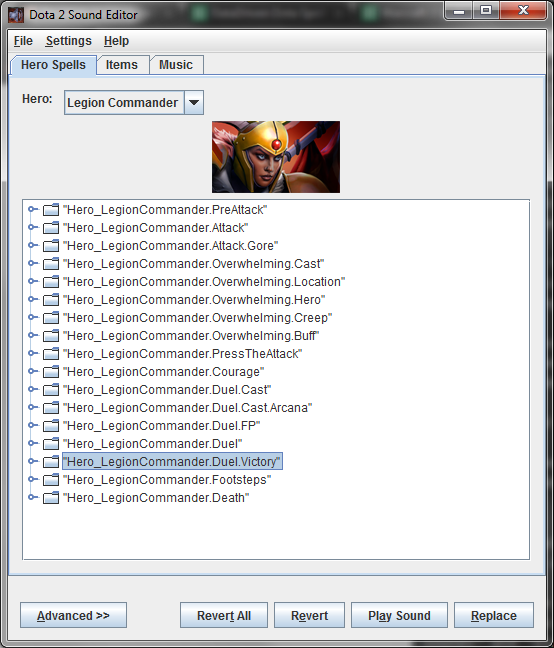
Select the skill and Ctrl+C
2. Precache the soundfile.
To find it, go into the Asset Browser within the tools and type sounds plus a part of the hero/item/file where the sound is stored. Searching for "legion sounds" and "diretide sounds" gives us the full paths for the sound files:
"soundevents/game_sounds_heroes/game_sounds_legion_commander.vsndevts""soundevents/game_sounds_stingers_diretide.vsndevts"
Example: Item with custom Equip and Drop sound. Many item values (like cost or icon) are omitted to keep it shorter, the game will use many default values.
"item_custom"
{
    "ID" "1100"
    "BaseClass" "item_datadriven"
    "AbilityTexture" "item_rapier"
    "Model" "models/props_gameplay/recipe.vmdl"
    "Effect" "particles/generic_gameplay/dropped_item.vpcf"

    "precache"
    {
        "soundfile" "soundevents/game_sounds_heroes/game_sounds_legion_commander.vsndevts"
        "soundfile" "soundevents/game_sounds_stingers_diretide.vsndevts"
    }

    "OnEquip"
    {
        "FireSound"
        {
            "EffectName" "Hero_LegionCommander.Duel.Victory"
            "Target"     "CASTER"
        }
    }

    "OnUnequip"
    {
        "FireSound"
        {
            "EffectName" "diretide_roshdeath_Stinger"
            "Target"     "CASTER"
        }
    }

}Tip: You can write -item item_custom with cheats enabled to give your main hero this item.
TODO: More on sounds in a new tutorial
Other less common Ability Events
Never tried these, need experimenting and some example links. Some events can also be globally controlled through Lua events, so you won't see many codes using them.
OnUpgrade
Upgrading the ability from the HUD. Useful for abilities that have multiple spells that need to be leveled together.
Example: Spirit Bear leveling up when you upgrade the spell, Extra Meepo appearing when you skill ult.
OnAbilityPhaseStart
Triggers when the ability is cast (before the unit turns toward the target). Ability Phase is a time between which the ability has been cast and which the unit has been told to cast.
Example: Sniper ult
Modifier Events
Create and Destroy
- OnCreated - The modifier has been created.
- OnDestroy - The modifier has been removed.
To Apply or Destroy a modifier (one without the Passive value), there's 2 very common Actions, which are usually applied by an Ability Event like OnSpellStart:
"ApplyModifier"
{
    "ModifierName" "modifier_test"
    "Target" TARGETKEY
}

"RemoveModifier"
{
    "ModifierName" "modifier_test"
    "Target" TARGETKEY
}When trying to ApplyModifier with a ModifierName that already exists on the Target, it will override it unless it has the "Attributes" "MODIFIER_ATTRIBUTE_MULTIPLE" key value.
Attempting to RemoveModifier that doesn't exist on the unit won't generate any problems.
Example: Toggle to Apply/Remove a Rot particle effect on the unit with this spell.
AttachEffect uses a ControlPoints block to control the radius of the particle system. This is not necessary for most particles that are designed as self buffs, but as in this case the particle allows for a variable radius, we can make use of it.
Each Particle has its own Control Points and discovering/managing them is a topic for another tutorial.
"ability_modifier_test"
{
    // General
    //-------------------------------------------------------------------------------------
    "BaseClass" "ability_datadriven"
    "AbilityBehavior" "DOTA_ABILITY_BEHAVIOR_NO_TARGET | DOTA_ABILITY_BEHAVIOR_TOGGLE"

    // Stats
    //-------------------------------------------------------------------------------------
    "AbilityManaCost" "0"
    "AbilityCooldown" "0"

    // Special
    //-------------------------------------------------------------------------------------
    "AbilitySpecial"
    {
        "01"
        {
            "var_type" "FIELD_INTEGER"
            "radius" "500"
        }
    }

    "precache"
    {
        "particle" "particles/units/heroes/hero_pudge/pudge_rot.vpcf"
    }

    // Data Driven
    //-------------------------------------------------------------------------------------
    "OnToggleOn"
    {
        "ApplyModifier"
        {
            "ModifierName" "modifier_example"
            "Target" "CASTER"
        }
    }

    "OnToggleOff"
    {
        "RemoveModifier"
        {
            "ModifierName" "modifier_example"
            "Target" "CASTER"
        }
    }

    "Modifiers"
    {
        "modifier_example"
        {
            "IsBuff" "1"
            "IsHidden" "0"
            "Passive" "0"

            // Modifier Events
            //-----------------------------------------------------------------------------
            "OnCreated"
            {
                "AttachEffect"
                {
                    "Target" "CASTER"
                    "EffectName" "particles/units/heroes/hero_pudge/pudge_rot.vpcf"
                    "EffectAttachType" "follow_origin"

                    "ControlPoints"
                    {
                        "00" "0 0 0"
                        "01" "%radius 0 0"
                    }
                }
            }
        }
    }
}For the following examples I'm gonna skip the AbilityBehavior, AbilitySpecials and other values and jump straight into the modifier blocks. You should be able to replace "modifier_rot" for a new modifier and change the Apply & Remove, or just add new ones.
Every value with a % is a replacement of an AbilitySpecial, so make sure to also add those when adding new modifier examples.
TODO: More on Particle Attachments.
Repeating actions
- OnIntervalThink
Together with "ThinkInterval" "%value" this will repeat the actions in this block every %value seconds.
Example: Do damage per second for the duration of the modifier.
"modifier_dot"
{
    "Duration" "%duration"
    "ThinkInterval" "1"
    "OnIntervalThink"
    {
        "Damage"
        {
            "Type" "DAMAGE_TYPE_MAGICAL"
            "Damage" "%AbilityDamage"
            "Target"    "TARGET"
        }
    }
}Example 2: Expanding on the Toggle example, adding this to a modifier will call a Script Function every ThinkInterval. In this case, it calls a function to spend the mana and deactivate the ability when the cost per second can't be met.
    "ThinkInterval" "1"
    "OnIntervalThink"
    {
        "RunScript"
        {
            "ScriptFile" "abilities.lua"
            "Function"   "maintain_toggle"
        }
}The Script is very simple:
function maintain_toggle( event )
    local manacost_per_second = 10
    -- if the caster has enough mana left to maintain the spell, spend it. Else, toggle the ability off
    if event.caster:GetMana() >= manacost_per_second then
        event.caster:SpendMana( manacost_per_second, event.ability)
    else
        event.ability:ToggleAbility()
   end
endPut it in a script file named abilities.lua inside the vscripts folder, or change the ScriptFile path (it accepts relative paths to vscripts).
Attacking, Starting and Landing Attacks
There's 6 different Modifier Events to detect attacks at different points:
- OnAttack
- OnAttacked
- OnAttackStart
- OnAttackLanded
- OnAttackFailed
- OnAttackAllied
OnAttack
The unit this modifier is attached to has completed an attack.
Example: Magic damage instance on each attack.
This will trigger even on misses. For a more controllable trigger, use the OnAttackStart & OnAttackLanded Events.
"modifier_magic_attack"
{
    "IsBuff" "1"
    "Passive" "1"
    "IsHidden" "0"

    "OnAttack"
    {
        "Damage"
        {
           "Type" "DAMAGE_TYPE_MAGICAL"
           "Damage" "%MagicDamage"
           "Target" "TARGET"
        }
    }
}OnAttacked
The unit this modifier is attached to has been attacked (fires at the end of the attack).
Example: This simulates an Out of Combat buff, with 7 second of "combat detection".
Passively it provides a regen buff, but a debuff is applied in both OnAttack and OnAttacked adding the same health regen as a negative value. As the modifier is unique unless we explicitly make it MULTIPLE, it will only be applied once.
"modifier_out_of_combat_buff"
{
    "IsBuff" "1"
    "Passive" "1"
    "IsHidden" "0"
    "Properties"
    {
        "MODIFIER_PROPERTY_HEALTH_REGEN_PERCENTAGE" "10"
    }

    // Particle Effect to visualize it
    "OnCreated"
    {
        "AttachEffect"
        {
            "Target" "CASTER"
            "EffectName" "particles/units/heroes/hero_legion_commander/legion_commander_press.vpcf"
            "EffectAttachType" "follow_origin"
            "EffectLifeDurationScale" "1"
        }
    }

    "OnAttacked"
    {
        "ApplyModifier"
        {
            "ModifierName" "modifier_warchasers_solo_buff_combat"
            "Target" "CASTER"
        }
    }
    "OnAttack"
    {
        "ApplyModifier"
        {
            "ModifierName" "modifier_warchasers_solo_buff_combat"
            "Target" "CASTER"
        }
    }
}

"modifier_warchasers_solo_buff_combat"
{
    "EffectName" "particles/items2_fx/satanic_buff.vpcf"
    "EffectAttachType" "follow_origin"

    "IsHidden" "1"
    "Duration" "7"
    "Properties"
    {
        "MODIFIER_PROPERTY_HEALTH_REGEN_PERCENTAGE" "-10"
    }
    "Attributes" "MODIFIER_ATTRIBUTE_IGNORE_INVULNERABLE"
}OnAttackStart
The unit this modifier is attached to has started to attack a target (when the attack animation begins, not when the autoattack projectile is created). This can be used to apply modifiers pre attack like crit.
Example: Give Random modifier when the attack starts, which will be removed when it ends. Half attacks do crits, half attacks stun the caster briefly.
"modifier_luck"
{
    "IsHidden" "1"
    "IsBuff" "1"
    "Passive" "1"

    "OnAttackStart"
    {
        // Remove the modifier on each attack start to disable people
        // from canceling attacks to get a guaranteed crit.
        "RemoveModifier"
        {
            "ModifierName" "modifier_good_luck"
            "Target" "CASTER"
        }
        "Random"
        {
            "Chance" "50"
            "OnSuccess"
            {
                "ApplyModifier"
                {
                    "ModifierName" "modifier_good_luck"
                    "Target" "CASTER"
                }
            }
            "OnFailure"
            {
                "Stun"
                {
                    "Target" "CASTER"
                    "Duration" "0.5"
                }
            }
        }
    }
}

"modifier_good_luck"
{
    "IsHidden" "1"
    "Properties"
    {
        "MODIFIER_PROPERTY_PREATTACK_CRITICALSTRIKE" "%crit_bonus"
    }

    "OnAttackLanded"
    {
        "RemoveModifier"
        {
            "ModifierName" "modifier_good_luck"
            "Target" "CASTER"
        }
    }
}OnAttackLanded
The unit this modifier is attached to has landed an attack on a target.
In addition to using it to remove a proc-attack modifier like in the last example, we can use this to trigger effects only when the attack actually lands (doesn't count misses).
Example: Static health gain and lifesteal percentage.
"modifier_lifesteal"
{
    "IsHidden" "1"
    "IsBuff" "1"
    "Passive" "1"
    "OnAttackLanded"
    {
        "Lifesteal"
        {
            "Target" "ATTACKER"
            "LifestealPercent" "%lifesteal"
        }
        "Heal"
        {
            "HealAmount" "20"
            "Target" "CASTER"
        }
    }
}OnAttackFailed
AttackFailed triggers on a Miss. You can use this to re-apply a modifier that is not supposed to be lost on missed hits, or to do anything related to effects after dodging.
Example: Grants extra attack speed for a duration after missing.
"modifier_on_miss"
{
    "IsHidden" "1"
    "IsBuff" "1"
    "Passive" "1"

    "OnAttackFailed"
    {
        "ApplyModifier"
        {
            "ModifierName" "modifier_extra_attackspeed"
            "Target" "CASTER"
        }
    }
}

"modifier_extra_attackspeed"
{
    "Duration" "%duration"
    "IsHidden" "0"
    "IsBuff"   "1"

    "Properties"
    {
        "MODIFIER_PROPERTY_ATTACKSPEED_BONUS_CONSTANT"  "%attack_speed_bonus"
    }
}OnAttackAllied
AttackAllied is triggered when attacking units on the same team. This can be enabled by adding this to a modifier on the unit you want to attack:
  "States"
  {
      "MODIFIER_STATE_SPECIALLY_DENIABLE" "MODIFIER_STATE_VALUE_ENABLED"
}Example: Knockback allies by attacking them.
"modifier_knockback_attack"
{
    "IsHidden" "0"
    "IsBuff" "1"
    "Passive" "1"

    "OnAttackAllied"
    {
        "Knockback"
        {
            "Target" "TARGET"
            "Distance" "250"
            "Height" "75"
            "Duration" "0.5"
        }
    }
}Damage Events
- OnDealDamage
- OnTakeDamage
OnDealDamage
The unit this modifier is attached to has dealt damage.
Example: Lifesteal from all sources of damage.
"modifier_much_lifesteal"
{
    "IsBuff"    "1"
    "IsHidden" "0"

    "OnDealDamage"
    {
        "Lifesteal"
        {
            "Target"    "ATTACKER"
            "LifestealPercent"  "%lifesteal"
        }
    }
}OnTakeDamage
The unit this modifier is attached to has taken damage. %attack_damage is set to the damage value after mitigation.
Example: Return all damage taken.
"modifier_return"
{
    "IsBuff"    "1"
    "IsHidden" "0"
    "Duration" "%duration"

    "OnTakeDamage"
    {
        "Damage"
        {
            "Target" "ATTACKER"
            "Type"   "DAMAGE_TYPE_PHYSICAL"
            "Damage" "%attack_damage"
        }
    }
}Killing and Dying
- OnDeath
- OnKill
- OnHeroKill
- OnRespawn
OnDeath
Similar to OnOwnerDied but as a Modifier Event.
Keep in mind that the ApplyModifier Action is way more manageable and cleaner than adding an ability to a unit, so this is the key for spells like "if the unit dies with this effect, it will do ...".
Example: When the unit with this modifier dies, it will do damage in a radius. It has a limited duration.
"modifier_damage_ondeath"
{
    "IsHidden" "0"
    "IsDebuff" "1"
    "Duration" "%duration"

    "OnDeath"
    {
        "Damage"
        {
            "Target"
            {
                "Center" "UNIT"
                "Radius" "%radius"
                "Teams" "DOTA_UNIT_TARGET_TEAM_ENEMY"
                "Types" "DOTA_UNIT_TARGET_HERO | DOTA_UNIT_TARGET_BASIC"
            }
            "Type"   "DAMAGE_TYPE_MAGICAL"
            "Damage" "%AbilityDamage"
        }
    }
}OnKill
This triggers if the unit with the modifier kills anything.
Example: Give bonus_damage for each creep, stacking.
"modifier_damage_onkill"
{
    "Passive" "1"

    "OnKill"
    {
        "ApplyModifier"
        {
            "ModifierName"   "modifier_damage_per_kill"
            "Target"         "CASTER"
        }
    }
}

"modifier_damage_per_kill"
{
    "IsHidden" "1"
    "IsBuff" "1"

    "Properties"
    {
        "MODIFIER_PROPERTY_PREATTACK_BONUS_DAMAGE" "%bonus_damage"
    }
}In this modifier the Buff indicator for each kill is hidden, because otherwise it would show a single buff icon for every killed unit and quickly hit the limit. IsHidden and IsBuff values are omitted on the first modifier to show that it will use the default values: "IsHidden" "0" and "IsBuff" "1".
To handle the stacks we need to use Lua.
OnHeroKill
Unlike OnKill this only triggers after an enemy hero kill.
- Examples: Urn, Silencer/Pudge kill counters, Bloodstone
OnRespawn
- Example: Respawning multiple meepos when the main one respawns
Orb Effects
AbilityBehavior Needed: DOTA_ABILITY_BEHAVIOR_ATTACK
These 3 are meant to be used together inside a modifier:
- Orb
- OnOrbFire
- OnOrbImpact
Orbs are Unique Attack Modifiers that don't stack with other Orbs.
Along with the Attack behavior it's common to add DOTA_ABILITY_BEHAVIOR_AUTOCAST, DOTA_ABILITY_BEHAVIOR_UNIT_TARGET or DOTA_ABILITY_BEHAVIOR_PASSIVE to this type of ability.
Example: This is an autocast Orb with a magic missile projectile that spends mana as OnOrbFire and applies a modifier, damage and sound OnOrbImpact. The modifier_black_arrow is left out — it can be whatever we've already seen.
"orb_example"
{
    // General
    //-------------------------------------------------------------------------------------
    "BaseClass" "ability_datadriven"
    "AbilityBehavior"   "DOTA_ABILITY_BEHAVIOR_UNIT_TARGET | DOTA_ABILITY_BEHAVIOR_AUTOCAST | DOTA_ABILITY_BEHAVIOR_ATTACK"
    "AbilityUnitTargetTeam" "DOTA_UNIT_TARGET_TEAM_ENEMY"
    "AbilityUnitTargetType" "DOTA_UNIT_TARGET_HERO | DOTA_UNIT_TARGET_BASIC"

    // Stats
    //-------------------------------------------------------------------------------------
    "AbilityCastRange"  "600"
    "AbilityManaCost"   "10"

    "precache"
    {
        "particle"  "particles/units/heroes/hero_vengeful/vengeful_magic_missle.vpcf"
        "soundfile" "soundevents/game_sounds_heroes/game_sounds_medusa.vsndevts"
    }

    // Special
    //-------------------------------------------------------------------------------------
    "AbilitySpecial"
    {
        "01"
        {
            "var_type"  "FIELD_INTEGER"
            "bonus_damage"  "10 20 30 40"
        }
    }

    // Data Driven
    //-------------------------------------------------------------------------------------
    "Modifiers"
    {
        "modifier_orb"
        {
            "Passive"   "1"
            "IsHidden"  "1"
            "Orb"
            {
                "Priority"  "DOTA_ORB_PRIORITY_ABILITY"
                "ProjectileName" "particles/units/heroes/hero_vengeful/vengeful_magic_missle.vpcf"
                "CastAttack"    "1" //This ensures the effect doesn't fire every time
            }

            "OnOrbFire"
            {
                "SpendMana"
                {
                    "Mana" "%AbilityManaCost"
                }
            }

            "OnOrbImpact"
            {
                "ApplyModifier"
                {
                    "ModifierName"  "modifier_black_arrow"
                    "Target"    "TARGET"
                }

               "FireSound"
               {
                   "EffectName" "Hero_Medusa.MysticSnake.Target"
                   "Target" "CASTER"
               }

               "Damage"
               {
                   "Type" "DAMAGE_TYPE_PHYSICAL"
                   "Damage" "%bonus_damage"
                   "Target" "TARGET"
               }
          }
     }
}Other less common Modifier Events
- Ability casting
- OnAbilityExecuted
- OnAbilityEndChannel
- Health and Mana
- OnHealReceived
- OnHealthGained
- OnManaGained
- OnSpentMana
- Movement
- OnOrder
- OnUnitMoved
- OnTeleported
- OnTeleporting
- Projectile Miss
- OnProjectileDodge
- Others
- OnStateChanged
OnAbilityExecuted
Any ability (including items) was used by the unit with this modifier.
Example: Refresh chance on ability used. The DelayedAction block is to wait for the skill to start the cooldown. This uses a simple lua script, explained after the datadriven ability code.
"ability_preparation"
{
    // General
    //-------------------------------------------------------------------------------------
    "BaseClass" "ability_datadriven"
    "AbilityBehavior"   "DOTA_ABILITY_BEHAVIOR_PASSIVE"
    "MaxLevel" "1"

    "precache"
    {
        "particle"  "particles/items2_fx/refresher.vpcf"
    }

    // Special
    //-------------------------------------------------------------------------------------
    "AbilitySpecial"
    {
        "01"
        {
            "var_type"  "FIELD_INTEGER"
            "refresh_chance"    "5"
        }
    }

    // Data Driven
    //-------------------------------------------------------------------------------------
    "Modifiers"
    {
        "preparation_modifier"
        {
            "Passive"   "1"
            "IsBuff"    "1"
            "IsHidden"  "1"

            "OnAbilityExecuted"
            {
                "Random"
                {
                    "Chance"    "%refresh_chance"
                    "OnSuccess"
                    {
                        "DelayedAction"
                        {
                            "Delay" "0.1"
                            "Action"
                            {
                                "RunScript"
                                {
                                    "ScriptFile"    "abilities.lua"
                                    "Function"  "refresh_cooldowns"
                                }
                            }
                        }

                        "FireSound"
                        {
                            "EffectName"    "DOTA_Item.Refresher.Activate"
                            "Target" "CASTER"
                        }

                        "AttachEffect"
                        {
                            "EffectName" "particles/items2_fx/refresher.vpcf"
                            "EffectAttachType" "follow_origin"
                        }
                    }
                }
            }
        }
    }
}This is a very simple lua script. It goes through every ability doing EndCooldown (we don't need to check ability:IsCooldownReady() as the function will work in any case).
function refresh_cooldowns( event )
    print("refreshing cooldowns")

    local hero = event.caster

    for i=0,4 do
        local ability = hero:GetAbilityByIndex(i)
        ability:EndCooldown()
    end
endOnAbilityEndChannel
This triggers when the unit that has this modifier ends a channel (be it in any of the 3 types: OnChannelFinish, Interrupted or Succeeded).
OnAbilityStart (doesn't work)
The difference from OnSpellStart is that this being a Modifier Event, you can apply it on a target to trigger any Actions.
Example: Apply a modifier that will kill the target as soon as they cast a spell, or causes the target's size to change randomly every time they cast a spell.
Modifiers to detect Heal and Mana changes in a unit
OnHealReceived
Example: Oracle ult
OnHealthGained
Example: Wisp Tether
OnManaGained
Example: Wisp Tether
OnSpentMana
Example: Nether ward
Modifier Events to detect movement
OnOrder
Triggers on Move/Casting/Hold/Stop
OnUnitMoved
Example: Bloodseeker ult
OnTeleported
OnTeleporting
OnProjectileDodge
The unit with this modifier dodged a projectile.
OnStateChanged
(Might) Trigger when the unit gets a modifier.